• Skip to primary navigation
  • Skip to main content
  • Skip to primary sidebar

John August

  • Arlo Finch
  • Scriptnotes
  • Library
  • Store
  • About

flagged

Getting things done

April 15, 2010 Random Advice

questionmarkHow do you handle task management? I feel like every six weeks I try a new system and none of them seem to stick. Email reminders, iCal To Dos, “Things” for iPhone/iPad. I even tried index cards on a spare bulletin board.

Do you have a system you like and have stuck with?

— Jack
Atlanta

random adviceI use Things for the Mac, iPhone and iPad.

I like it, but I share everyone’s standard complaint about it: your various devices should sync through the cloud, not just on local wi-fi.

Before Things, I was using a pretty standard GTD/Moleskine dash-plus setup. It worked reasonably well for me, but I didn’t like carrying around the extra notebook when I already had my iPhone. Plus, I’m at my desktop computer 80% of the time, so the ability to generate linked items with a quick keystoke pushed me over to Things.

Any system is only as good as the person using it. Task management thrives on small, quickly accomplished items. Learning how to break big jobs into little ones is a pretty crucial skill.

While I don’t go to nearly the OCD levels of many of his followers, I think David Allen’s Getting Things Done is a good primer for anyone.

Reading scripts on the iPad

April 3, 2010 Film Industry, Geek Alert, Reading

Screenplays are almost always distributed as .pdfs, so many screenwriters (and other film-and-TV-types) have been hoping that the iPad’s large screen and innate support for .pdfs would make it an ideal reading device.

Steve Jobs heard your prayers. It’s really, really good for reading scripts.

The iPad’s built-in apps handle .pdfs pretty transparently. Click a link in Safari, or an attachment in Mail, and the iPad shows you a very accurate Quick Look. For something short like a scanned article, it’s dandy.

But the default reader doesn’t scale well to screenplays:

  • Screenplays are long. They average around 120 pages — and there’s no way to skip ahead to page 48 without frantic swiping.
  • You can’t mark your place. Click the home button and you’re back to page one.
  • You can’t search. In an electronic version, you should really be able to find the first time HORATIO speaks.
  • You can’t annotate, highlight or copy. You’re really just seeing a picture of the document, not the words themselves.

App Store to the rescue

iconAs of this writing — on iPad’s launch day — there are at least six dedicated .pdf readers in the App Store. My favorite at the moment is GoodReader – Tablet Edition, which is currently priced at 99 cents. There will no doubt be more contenders in the weeks and months to come, so keep in mind this endorsement has an expiration date. It’s the best solution I’ve found today.

GoodReader has multiple ways of importing .pdfs. The most straightforward is Web Downloads. Use the built-in browser to poke around the web to the file you want, then let GoodReader slurp it in. Any of the scripts in the Library, for example, are clicks away.

Most of the scripts I read come attached to emails. All the readers in the App Store have means of shuffling these files from your computer to your iPad — most often through iTunes — but I wanted a solution that didn’t use an intermediary computer. That’s ultimately what put GoodReader ahead of the others.

GoodReader’s Connect to Servers tab lets you log in to your mail server and check for messages with attachments. Choose the message, select the .pdf you want to import, and it shows up in your sidebar. Keep in mind that GoodReader is actually accessing your mail account. This may make you (and your system administrators) uncomfortable. As a workaround, you may want to set up an email account (perhaps at Gmail) that is just for scripts you want to read. Forward scripts to that account, and give GoodReader that login info.

Just for reading

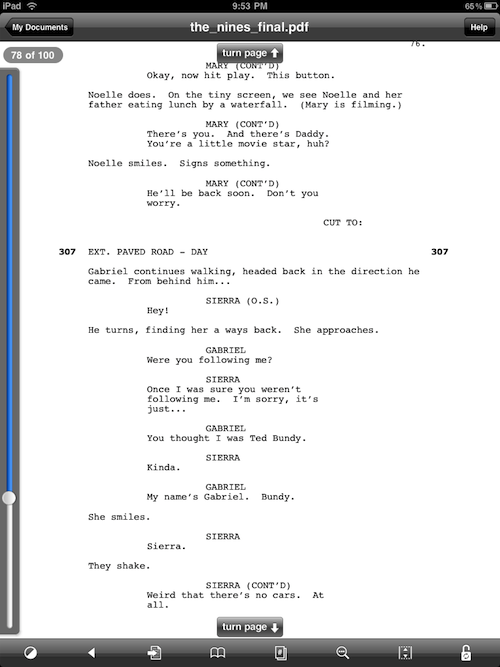
Once you have a .pdf open in GoodReader — or any of these apps — the experience is solid. Simple taps or gestures let you flip pages, while more-traditional scrollbars appear to let you zip ahead.

goodreader

This screenshot shows GoodReader at its most cluttered; a tap in the center makes all the UI go away. I found myself wanting to turn pages with taps on the edges like iBooks and Kindle, but an upward swipe ends up being fairly natural.

GoodReader has no markup or highlighters. Some of the competitors do, along with note-taking features. I often write on printed drafts of scripts, but will I ultimately do the same on the iPad? It’s too soon to tell.

All of these apps will get better. This article will quickly get outdated. But I’m happy to report that as of today, the iPad is already a much better reader for screenplays than anything that has come before it.

Snake People

March 29, 2010 Projects, Snake People, The Variant

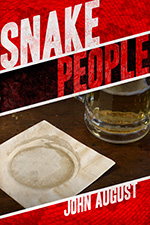
snake people coverI have a brand-new short story called Snake People. It’s available today, free.

Snake People is a bit shorter than The Variant, and…well, kinkier. By movie terms, it would still be Rated R, but I feel some fair warning is called for. It’s both fleshy and scaly.

The story is part of Popcorn Fiction, an ongoing anthology of short fiction by screenwriters, including original work by Scott Frank, Larry Doyle, Jeff Lowell and many others. Derek Haas created the whole endeavor.

Cover art is by Ryan M. Nelson.

The Variant, free this weekend

March 26, 2010 Books, Projects, The Variant

On Monday, I’ll be publishing a brand new short story.

As with last May’s The Variant, I used an ad hoc collection of Twitter followers as a focus group. So if a few people claim to have read it, they might be telling the truth.

But they haven’t seen the cover art. Here’s an ambiguous detail from it: cover detail

In the meantime, I want to offer up The Variant for anyone who might have missed it. For this weekend only, you can download the .pdf free.

« Previous Page
Next Page »

Primary Sidebar

Newsletter

Inneresting Logo A Quote-Unquote Newsletter about Writing
Read Now

Explore

Projects

  • Aladdin (1)
  • Arlo Finch (27)
  • Big Fish (88)
  • Birdigo (2)
  • Charlie (39)
  • Charlie's Angels (16)
  • Chosen (2)
  • Corpse Bride (9)
  • Dead Projects (18)
  • Frankenweenie (10)
  • Go (29)
  • Karateka (4)
  • Monsterpocalypse (3)
  • One Hit Kill (6)
  • Ops (6)
  • Preacher (2)
  • Prince of Persia (13)
  • Shazam (6)
  • Snake People (6)
  • Tarzan (5)
  • The Nines (118)
  • The Remnants (12)
  • The Variant (22)

Apps

  • Bronson (14)
  • FDX Reader (11)
  • Fountain (32)
  • Highland (75)
  • Less IMDb (4)
  • Weekend Read (64)

Recommended Reading

  • First Person (87)
  • Geek Alert (151)
  • WGA (162)
  • Workspace (19)

Screenwriting Q&A

  • Adaptation (65)
  • Directors (90)
  • Education (49)
  • Film Industry (489)
  • Formatting (128)
  • Genres (89)
  • Glossary (6)
  • Pitches (29)
  • Producers (59)
  • Psych 101 (118)
  • Rights and Copyright (96)
  • So-Called Experts (47)
  • Story and Plot (170)
  • Television (165)
  • Treatments (21)
  • Words on the page (238)
  • Writing Process (177)

More screenwriting Q&A at screenwriting.io

© 2026 John August — All Rights Reserved.