• Skip to primary navigation
  • Skip to main content
  • Skip to primary sidebar

John August

  • Arlo Finch
  • Scriptnotes
  • Library
  • Store
  • About

QandA

Fixing double-spaces after periods

June 10, 2005 Formatting

Before I was a screenwriter, I worked in graphic design, with a font collection that was the envy of my dorm floor. So it’s life’s cruel joke that I now make my living in 12-pt. Courier.

Modern typefaces are designed to look best with a single space after the period which ends a sentence. (Or the full stop, for the British in the room.) Courier, however, is not such a typeface. As a monospace font, it looks best with two spaces after the period.

When writing a script, it’s pretty easy to type two spaces sometimes, one space other times. Before printing the “final” draft, you could scroll through the whole document, looking for periods with only one space. But it’s much easier to use Find and Replace.

This trick works in pretty much any word processor, including both Final Draft and Movie Magic Screenwriter.

Converting to two spaces

  1. Choose “Find…”
  2. In the Find field, type . followed by two spaces.
  3. In the Replace field, type . followed one space.
  4. Click Replace All. You should get a dialog box that shows a large number of changes. Yes, you’ve just made every sentence wrong. What’s important is that they’re all wrong in exactly the same way.
  5. Back in the Find field, type . followed one space.
  6. In the Replace field, type . followed by two spaces.
  7. Click Replace All.
  8. Look through the script. You should have two spaces after every period. However, you may find that you also have two spaces in case where you shouldn’t (like after “Mr.” or “Dr.”).
  9. If so, Find “Mr.” followed by two spaces, and Replace with “Mr.” followed by one space.
  10. Repeat as needed with “Dr.” or “Mrs.”

In my opinion, Courier looks best with two spaces after the colon as well. The same technique works.

In programs that allow it, a technically-savvy wordsmith could use regular expressions to do all of this in one step, matching the period only in cases where it is followed by exactly one space. But considering this whole process generally takes less than 20 seconds, I’m not sure it’s worth it.

If you find yourself writing a letter or some other document in a non-Courier font, you may want to do just the opposite, converting two spaces to one. That’s a lot easier.

Converting to one space

  1. Choose “Find…”
  2. In the Find field, type . followed by two spaces.
  3. In the Replace field, type . followed by one space.
  4. Click Replace All.
  5. Keep clicking Replace All until there are no more replacements. (It may take a few times through.)
  6. Look through the script. You should have one space after every period.

Writing when the movie could get ruined

June 9, 2005 Psych 101, QandA

questionmarkWhen you conceive a great screenplay idea do you ever
worry about how that idea might be destroyed if and
when it gets produced as a film? How do you overcome
the anxiety that a great idea will be poorly executed
and go on writing?

— Ralph
Los Angeles, CA

Whether it’s an original script or an adaptation, screenwriters have every reason to worry that their great script will get butchered, mangled and ruined. At least in terms of plot and character, my hunch is that most movies were significantly better before they were filmed — generally, at the draft when the director signed on. Because it’s after that point that the compromises begin: we can’t afford that location; the actor doesn’t like that moment; we need to cut 10 pages for budget.

This is what sucks about screenwriting. Unlike a novel, a screenplay is not a “final” art form. However beautifully written, it’s essentially a plan for making a movie. And plans change.

Even if a screenwriter directs her own movie, it’s never going to be as perfect as it was on the page. Between the camera, the actors, the lights and the locations, nothing will be exactly as she planned it. Directors like George Lucas and Robert Rodriguez may use technology to nudge their films closer and closer to their original vision, but it’s never going to be quite what they imagined. For instance, I bet JarJar Binks was great on the page.

So, knowing that things will get changed, and quite possibly ruined, how does the screenwriter avoid creative paralysis?

You have to embrace the chaos on some level. Moviemaking is like white-water rafting. You know you’re going to get from point A to point B, but it’s going to be scary along the way. You’ll have to paddle your ass off. You might get thrown from the boat. But if you make it down in one piece, that’s success.

If you’re not comfortable with those risks, screenwriting isn’t for you. There are many safer and less terrifying literary forms out there.

Handling dialogue-like situations

June 9, 2005 Formatting, QandA

questionmarkI’m writing a screenplay where a magical typewriter communicates to people by typing them messages. Nothing verbal. Since this will be a selling script is ok to put in a note saying this, then proceed as…

TYPEWRITER

Hi John, how are you today?

Or is there another way to do this? This type of communication will exist through the entire story.

— Harry
Detroit

Since the typewriting is “speaking” dialogue, your way is fine. If it only happened once or twice in the script, I would be tempted to put the typing in boldface, centered on the page. But that would get really annoying, really quick. For what you’re attempting, faux-dialogue is best.

Screenwriting wastes a lot of paper

June 8, 2005 QandA, Recycled, Writing Process

Do you print out your script pages as you go along, or do you wait until you have a completed draft before printing out the whole thing (assuming you’re using a word processor and not a typewriter.) There’s nothing more motivating to me than to see pages of script piling up, but then if I want to make a change to what I’ve written already there’s a potential for waste and I feel bad enough that we’re still using trees for paper instead of something more plentiful and efficient like cotton or hemp.
–Rob Workman
Saint Paul, MN

In the early days of ink-jet printers, there was a lot more incentive to economize: printing an entire script could take half an hour, and cost a few bucks’ worth of ink. Now, with fast-and-cheap laser printers, the temptation is to print a lot more. Fight it. The business of making movies already wastes a lot of paper — everything from call sheets, to budgets, to rainbow-colored script revisions. As a single screenwriter, you can at least make sure you’re not adding to the problem.

I tend to write first drafts longhand, scene by scene, and print out pages as they get typed up. Call it paranoid, but I like to have at least one hard copy in case my hard drive commits hara-kiri. So, for a normal first draft, that means about 240 pages — 120 hand-written, and 120 typed.

The real waste comes during countless drafts of the rewriting process. Here are some suggestions to keep it somewhat reasonable:

  1. Only print what you need.
    Before you hit Print, ask yourself if you really need the whole script, or whether you simply need a few pages. Often, your corrections are contained to just a few pages, and it’s easy to print only the range you need.
  2. Double-up.
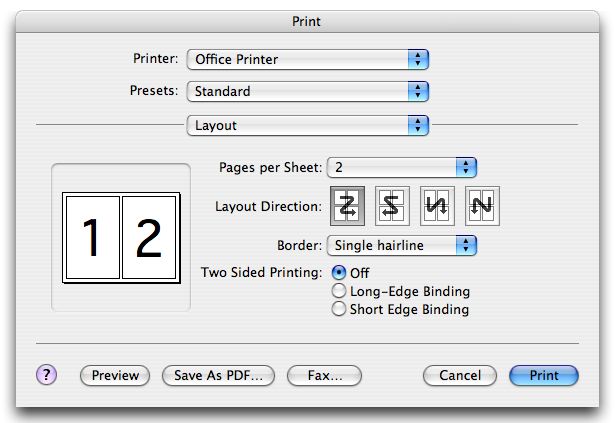
    If you’re using Mac OS X, use the pull-down menu in the Print dialog box to select ‘Layout’. Set it for two pages, with a hairline border. (Confused? Here’s a screenshot.) You’ll end up with two pages side-by-side, and it’s perfectly readable. Your 120-page script is now sixty pages, and can be held together with a binder clip. (Never hand in a script printed this way; keep it for your own use.)

  3. Use recycled paper.
    HP makes a good paper that’s 30% post-consumer. Unfortunately, recycled paper rarely comes three-holed, but if you’re printing the two-page layout, that doesn’t matter.

  4. Reuse the back sides.
    I avoid printing scripts on the back sides of scripts — I get confused which pages are new. But script pages are perfectly good scratch paper for everything else you need to print.

  5. Use .pdfs.
    If you’re giving somebody your script to read, consider emailing them a .pdf rather than printing it out. These days, almost anyone can handle a .pdf file.

Even if you only implement a few of these suggestions, you can cut your paper use by 75%. Until they start making hemp copier paper, you’re doing your part to keep the trees in the forest where they belong.

(Originally posted January 20, 2005.)

« Previous Page
Next Page »

Primary Sidebar

Newsletter

Inneresting Logo A Quote-Unquote Newsletter about Writing
Read Now

Explore

Projects

  • Aladdin (1)
  • Arlo Finch (27)
  • Big Fish (88)
  • Birdigo (2)
  • Charlie (39)
  • Charlie's Angels (16)
  • Chosen (2)
  • Corpse Bride (9)
  • Dead Projects (18)
  • Frankenweenie (10)
  • Go (29)
  • Karateka (4)
  • Monsterpocalypse (3)
  • One Hit Kill (6)
  • Ops (6)
  • Preacher (2)
  • Prince of Persia (13)
  • Shazam (6)
  • Snake People (6)
  • Tarzan (5)
  • The Nines (118)
  • The Remnants (12)
  • The Variant (22)

Apps

  • Bronson (14)
  • FDX Reader (11)
  • Fountain (32)
  • Highland (75)
  • Less IMDb (4)
  • Weekend Read (64)

Recommended Reading

  • First Person (87)
  • Geek Alert (151)
  • WGA (162)
  • Workspace (19)

Screenwriting Q&A

  • Adaptation (65)
  • Directors (90)
  • Education (49)
  • Film Industry (489)
  • Formatting (128)
  • Genres (89)
  • Glossary (6)
  • Pitches (29)
  • Producers (59)
  • Psych 101 (118)
  • Rights and Copyright (96)
  • So-Called Experts (47)
  • Story and Plot (170)
  • Television (165)
  • Treatments (21)
  • Words on the page (238)
  • Writing Process (177)

More screenwriting Q&A at screenwriting.io

© 2026 John August — All Rights Reserved.