• Skip to primary navigation
  • Skip to main content
  • Skip to primary sidebar

John August

  • Arlo Finch
  • Scriptnotes
  • Library
  • Store
  • About

John

Inneresting

September 20, 2018 News

Every week on Scriptnotes, Craig and I do our One Cool Things, through which we each recommend something worth checking out. Then on Twitter, I’ll link to things I think my followers may find interesting or useful.

But there’s a problem: neither venue is particularly well-suited to the task of collecting and presenting the cool stuff that’s out there.

If you don’t listen to the podcast, you won’t hear it. If you don’t follow me on Twitter — or if the algorithm doesn’t show you the tweet — you won’t see it. And I’m always hesitant to link to too much, because Twitter is overwhelming enough as it is.

So I’m trying something new: a little newsletter called Inneresting.
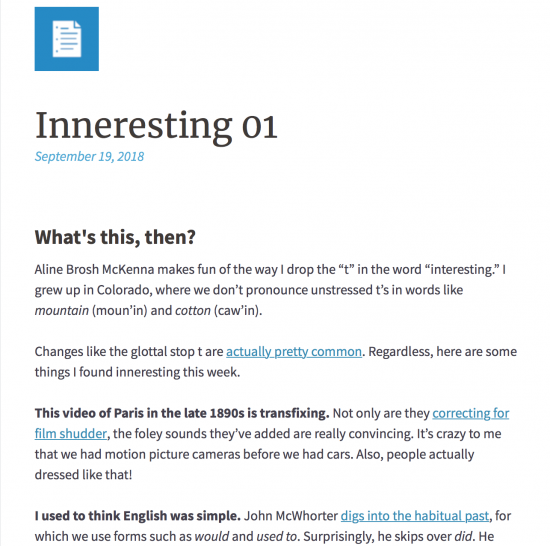
newsletter screenshot

It’s a weekly-ish roundup of stuff I’ve found interesting. There are some bits about writing and language, but the unifying theme is just that I’ve found these things worth pointing out.

Isn’t that what this blog is for? you ask. Well, sort of. Each newsletter could easily be a post on the site. But in order to read it, you’d have to think, huh I wonder if there’s a new post? and then click over to johnaugust.com. ((Or if you’re like me, you subscribe to the site’s feed through RSS. Congratulations! You’re one of the fraction of a percent of internet users who do that. Luckily, the newsletter has a feed as well.)) For a while, I ran a side blog called Off-Topic that was a similar idea, but how would a reader know when to check it?

Inneresting simply shows up in your email inbox. Read it whenever. I’ve turned off the creepy analytics. There are no trackers or data collectors other than occasional Amazon affiliate links. Basically, I know if you’ve subscribed and if you’re still opening the email. If you’re not, I’ll stop sending it.

Check out the first issue, and subscribe if you like it.
You can’t have my back and yours at the same time

September 12, 2018 Film Industry, Television

Writing for The Hollywood Reporter, Rebecca Sun and Jonathan Handel look at the controversy over agencies investing in TV and movies:

“The headline is that it’s bad for creators,” declares The Good Fight co-creator Robert King, who, notably, is a client of Paradigm, one of the agencies not moving into ownership (yet). “This is a black-and- white situation where agencies should not be a boss to clients.”

Even some agents are puzzled: “Who are you representing? Do you have [the writer’s] back or your back?” says Verve co-founder and partner Bryan Besser. “How do you have both backs?”

The article is one of the first I’ve read that gets agents on the record, but either the journalists didn’t ask or couldn’t get an answer to Besser’s fundamental question: How can agencies defend the conflict of interest inherent in employing their own clients?

The closest anyone gets to addressing the issue comes as simple whataboutism:

Agencies say they remain mystified as to why the WGA is beating up on them when talent management firms — an adjacent business — have been free to produce and own content for decades.

Officer, why is it a problem for us to run red lights when ambulances have been doing it forever?

Agents and managers aren’t the same thing, and agents know it. Agencies are defined under California law, with specific restrictions on what they can do and how much they can charge. They’re supposed to have a fiduciary responsibility to their clients. That means putting the interests of their clients before their own interests.

If we can’t expect that from our agents, we need better agents.

If they can’t earn enough off of 10% of our income, they should focus on getting us paid more.

Why Highland 2 doesn’t automatically add CONT’D

September 4, 2018 Formatting, Fountain, Highland

In screenplays, when a character continues speaking after a line or two of action, the convention is to write (CONT’D) after their second character cue.

TOM

Sure, these radioactive cockroaches might kill us all...

He gestures to a glowing wall of swarming roaches. Like a thousand tiny pixels, they form surreal moving images.

TOM (CONT’D)

But look how pretty!

Final Draft and many other screenwriting applications will add these (CONT’D)s automatically unless you tell them no. And you should say no.

These kind of (CONT’D)s should never be left to algorithms. I’ve written about this before: ((I was halfway through writing today’s post when I realized I’d blogged about CONT’D twice before. Apparently, I’ve defaulted to Tom and Mary in my examples since nearly the beginning of the blog. They’ve seen some shit.))

Consider Sandra Bullock’s character in Gravity. Minutes may elapse between her spoken dialogue, but Final Draft will default to adding the (CONT’D) since no other character has spoken in the interim. You can delete the (CONT’D), but it’s a hassle, and it will come right back if you reformat text around it.

To prevent this kind of Gravity situation, Final Draft could set a threshold where it only adds (CONT’D) if fewer than X lines of scene description interrupt the dialogue. But that wouldn’t catch a more common problem like this:

MARY

Tom, stop staring at them! They’re hypnotizing you!

But it’s too late: Tom is transfixed. He starts walking towards the reactor core, completely in the roaches’ thrall.

Mary grabs him, trying to hold him back. But he’s too strong.

Finally, Mary spots Hector up in the control room. She yells, hoping he can hear her --

MARY

Hector!

Mary’s shout to Hector isn’t a continuation of her previous dialogue. It’s a new thing. Some screenwriters would choose to add the (CONT’D), while others wouldn’t.

The point is, it’s a choice the writer should be making, not the software.

Highland 2 will auto-complete if you start typing the (CONT’D), but it won’t try to put it there by itself. That’s consistent with the general philosophy of Highland and other Fountain-based apps: we will never change your actual text.

Note that these CONT’Ds are a different species than dialogue breaks at the bottom of a page. In these circumstances, there’s no authorial intent. It’s simply the screenwriting software trying to fit an appropriate amount of text on a page, and signaling to the reader that dialogue keeps going.

Highland 2 adds these (MORE)s and (CONT’D)s when you print or preview. They’re not baked-in because page breaks can change as you add or delete text.

Highland 2.1 adds a lot of new functionality

August 17, 2018 Apps, Highland

Highland 2.1 showed up on the Mac App Store this afternoon. While it’s a “point one” release, it’s actually our tenth update since Highland 2 debuted in May.

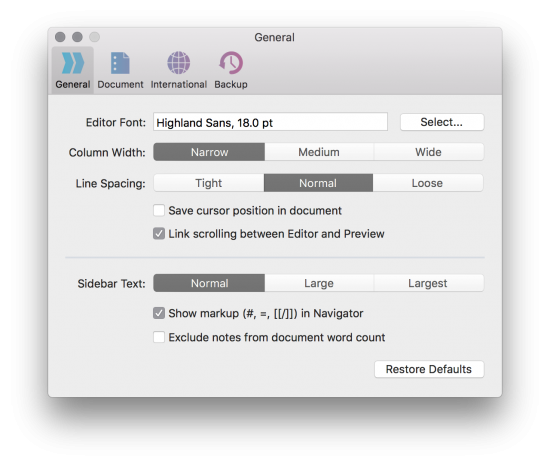
The biggest change you’ll notice in 2.1 is our reorganized Preferences window, which now features four tabs.

general preferences

In General preferences, you can choose to exclude notes, synopses and boneyards from word counts in Statistics or the status bar.

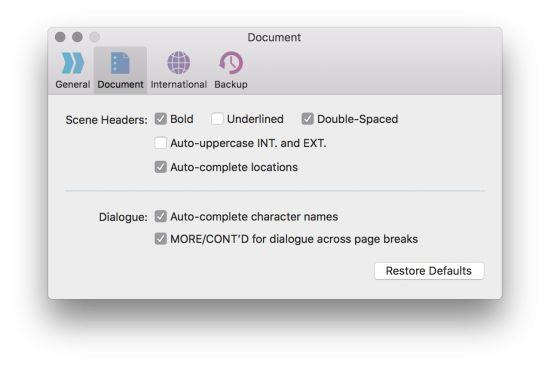
documents prefs

In Document preferences, you can opt to have scene headers underlined.

Scene heading styles are a matter of personal taste. These days, most of my scripts are using single-spaced bold headings, but there’s no one right way.

We debated whether this pane should be “Document” or “Fountain” or “Screenplay.” We ended up going with Document with the expectation that there will likely be more document-focused settings to come, including ones that apply to Markdown.

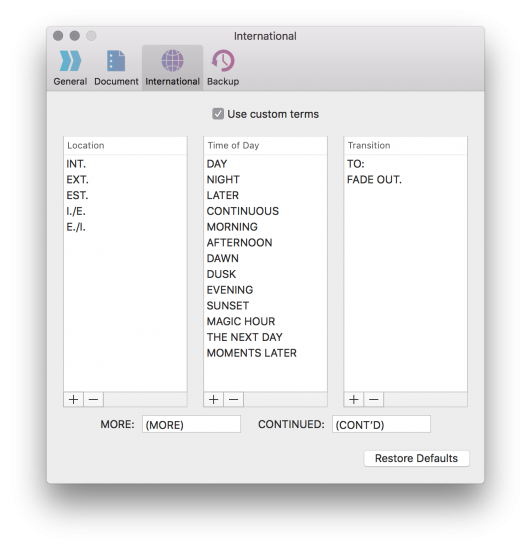
international prefs

This is big news for screenwriters working in languages other than English. By default, Highland (and other Fountain-based apps) look for certain terms that have special meaning, including INT. and EXT. for scene headings and TO: for transitions. But of course, these are only conventions in English.

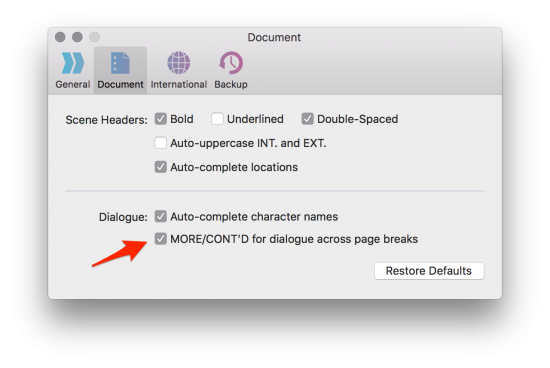
With Highland 2.1, writers can add to and amend these lists of terms, including times of day and MORE/CONT’D.

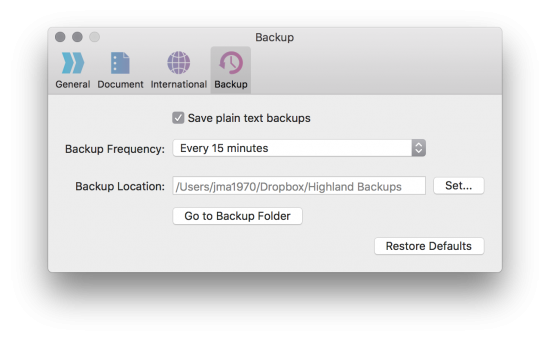
backup prefs

It’s always a good idea to backup your files in multiple locations and multiple ways. For me, the combination is Dropbox plus Time Machine.

In Highland 2.1, we added the ability to regularly back up your current documents in plain text. You can choose a backup folder — I created one on Dropbox — and rest assured that no matter what, there’s always a basic text version of your document stored somewhere.

It’s not an alternative to a consistent, system-wide backup plan, but it can provide a little extra peace of mind.

Small bit of usefulness

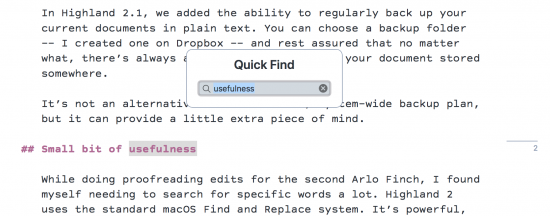
While doing proofreading edits for the second Arlo Finch, I found myself needing to search for specific words a lot. Highland 2 uses the standard macOS Find and Replace system. It’s powerful, but it’s a little cumbersome for what I wanted. So we added Quick Find, which keeps your eyes on the screen and fingers on the keyboard.

quick find

We also added a similar Jump To… for quickly hopping around your document’s headers and markers.

Markers can also now be named. Just add a colon and a label: {{%m:label}} You’ll see more functionality with markers coming in future builds.

A few other bits of functionality were introduced in previous builds, some of which you might have missed.

{{SERIES}} inserts auto-incrementing numbers. This was really helpful for Arlo Finch, because I could write headers as

markup for SERIES directive

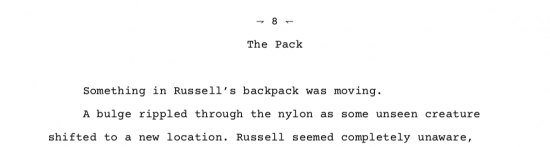
and have it automatically generate the chapter numbers.

screenshot of chapter in pdf

You can use {{SERIES}} for anything. For comic books, it’s a useful way to number panels.

{{TIMESTAMP}} inserts the date a document is previewed or printed (including in Fountain title pages). You can customize the formatting.

We’ve also made two more templates available in the free Highland Basic version: Stage Play and MLA Report.

And if you’re a screenwriter, you owe it to yourself to download our free 40-page booklet on Switching from Final Draft to Highland 2. It will quickly get you over any fears of leaving Final Draft, and show you some powerful techniques for getting the most out of Highland.

You can find Highland 2.1 on the Mac App Store. If you’re enjoying the app, please consider leaving us a review!

« Previous Page
Next Page »

Primary Sidebar

Newsletter

Inneresting Logo A Quote-Unquote Newsletter about Writing
Read Now

Explore

Projects

  • Aladdin (1)
  • Arlo Finch (27)
  • Big Fish (88)
  • Birdigo (2)
  • Charlie (39)
  • Charlie's Angels (16)
  • Chosen (2)
  • Corpse Bride (9)
  • Dead Projects (18)
  • Frankenweenie (10)
  • Go (29)
  • Karateka (4)
  • Monsterpocalypse (3)
  • One Hit Kill (6)
  • Ops (6)
  • Preacher (2)
  • Prince of Persia (13)
  • Shazam (6)
  • Snake People (6)
  • Tarzan (5)
  • The Nines (118)
  • The Remnants (12)
  • The Variant (22)

Apps

  • Bronson (14)
  • FDX Reader (11)
  • Fountain (32)
  • Highland (75)
  • Less IMDb (4)
  • Weekend Read (64)

Recommended Reading

  • First Person (87)
  • Geek Alert (151)
  • WGA (162)
  • Workspace (19)

Screenwriting Q&A

  • Adaptation (65)
  • Directors (90)
  • Education (49)
  • Film Industry (489)
  • Formatting (128)
  • Genres (89)
  • Glossary (6)
  • Pitches (29)
  • Producers (59)
  • Psych 101 (118)
  • Rights and Copyright (96)
  • So-Called Experts (47)
  • Story and Plot (170)
  • Television (165)
  • Treatments (21)
  • Words on the page (238)
  • Writing Process (177)

More screenwriting Q&A at screenwriting.io

© 2026 John August — All Rights Reserved.