• Skip to primary navigation
  • Skip to main content
  • Skip to primary sidebar

John August

  • Arlo Finch
  • Scriptnotes
  • Library
  • Store
  • About

John

General meetings don’t have to be general

August 21, 2020 Film Industry, Pitch Session, Producers, Psych 101

I like this advice from Jeff Nathanson:

It took me well over a decade to realize that general meetings are only general if I allowed them to be. And so, I changed my approach. I figured as long as I’m putting on a clean shirt and meeting with people who have the ability to hire me, I might as well try like hell to get a job.

I started to prepare for every general as if it would be my last. I would tailor a short pitch for specific executives (even when I was told not to pitch an idea). I would do my research, find out what movies they had in production, what scripts they were struggling with.

I asked questions, tried to cut through the general conversation and discuss passion projects. I asked studio executives about obscure titles they had in their library. And suddenly I started walking out with scripts under my arms, books to read, magazine articles they had optioned.

This approach makes even more sense in the age of Zoom. You need to be able to move pretty quickly from chit-chat to what you’d like to write, be it a property they control or something of your own.

This isn’t the time for a full pitch, but rather to frame an idea. “I really love heist movies. I’m working on one set on a super tanker. I’ve gone deep down the rabbit hole of research on it.”
Two transitions in a row

August 18, 2020 Formatting, QandA, Words on the page

Don Donahue writes:

How would you format two transitions in a row?

I’m experimenting with a transition where a drone gets shot down in Alaska. Right now I have…

CUT TO STATIC:

FADE TO BLIZZARD:

Is this acceptable? Is there a better way to do this?

This looks awkward. It feels like there’s something omitted between the two transitions. After all, the point of a transition is that you’re transitioning to something. That something is missing here.

It’s important to understand that by “transition” screenwriters are really talking about two distinct things:

  1. What we’re seeing on screen as we move from one scene to the next.
  2. The handoff from one idea to the next.

The first kind of transition happens on the right-hand margin, uppercase, often with a colon at the end. It’s unique to screenplay grammar.

In your example, FADE TO BLIZZARD is an example of this kind of transition. It’s strictly cinematic. You’re telling us what we’d see on screen, and giving specific instructions to an imaginary editor.

The second kind of transition happens in all kinds of writing. You see it novels, plays, non-fiction and journalism. I’d argue that at least half of the craft of writing is transitioning smoothly to the next thing.

In your example, CUT TO STATIC is describing what we’re seeing and hearing, but it’s the kind of thing the characters in the scene are probably experiencing firsthand. So I’d leave it in scene description.

Obviously, I don’t know exactly what’s happening in your scene, but let’s imagine it something like this:

Malcolm leans close, pointing to a dark smudge on the screen.

MALCOLM

There! What do you think that is?

DAHLIA

A bunker? Something’s moving inside.

CLOSE ON SCREEN, a FLASH. Something flies straight for the lens. Bright. Hot.

MALCOLM (O.S.)

Shit! A rocket!

Impact! The screen cuts to STATIC.

CROSS-FADE TO BLIZZARD.

EXT. ARCTIC STATION – NIGHT

HOWLING WINDS. The domes of the compound are just barely visible. Yellow work lights wobble.

Fade? Cross-fade? Your call. To me, FADE generally implies that we’re going to black or white.

You’ll notice I put a period after BLIZZARD rather than a colon. Blizzard is the thing we’re cross-fading to, so it feels like a complete thought. I’d give it a period.

The colon makes sense when the object of the transition is in the next line, like this:

DA’VONNE

I know where he’d hide it.

CUT TO:

INT. TRUCK GARAGE – NIGHT

With flashlights, Da’Vonne and Sarah make their way amid the massive semis and trailers.

Here, the CUT TO: is doing the work of both a cinematic transition (a blunt cut to the next place) and a narrative transition (answering the question “Where does Da’Vonne think it’s hidden?”).

Uppercased transitions are a useful tool for screenwriters, particularly when they can do this double-duty. But you’ll read many screenplays that hardly use them at all, and that’s fine too. They’re never strictly necessary.

How We Record Scriptnotes, 2020

August 6, 2020 Geek Alert, Meta, Tools

scripnotes coverMany listeners have asked how Craig and I record our weekly podcast. I wrote about it in 2013, but a few things have changed. So here’s an updated look at our standard operating procedures and gear.

When and what

Scriptnotes producer Megana Rao and Craig’s assistant Bo Shim figure out when we’re going to record. It’s usually a Thursday or Friday, late in the afternoon. Megana and I have usually talked over potential topics, but Craig and I will also text during the week to discuss. If it’s a Three Page Challenge, Megana will send each of us PDFs of the entries she’s picked.

We’re all working off a shared outline in WorkFlowy, which includes the episode number, today’s topics, listener questions, various housekeeping bits, and our One Cool Things. I recently made a template. If there’s anything we need to read aloud — for example, a quote from an article — I usually copy-paste it into this outline.

Since Craig works in Pasadena and I work in Hollywood, it’s not practical for us to be in the room together, so we record the podcast on Skype. This is the part many people can’t fathom — we’re almost never in the same room together. I lived in Paris during 2016 and 2017, yet we kept doing the show pretty much as normal. Whether you’re miles or time zones apart, you can do it.

It takes practice to keep up a conversation when you don’t have the usual physical cues. The first few episodes were rough. But I think the podcast is actually much better with Craig and I being apart; like the audience, we’re only hearing each other’s voice, so everything we’re communicating needs to happen in speech.

I don’t care about hearing myself through the headphones, but if you do, you may want to consider a setup that lets you plug headphones into the mic or mixer. If you let the audio round-trip through the computer, the lag will drive you crazy.

Editing

While Craig and I are talking on Skype, each of us has QuickTime running on our own computers to record only our side of the conversation. (File > New Audio Recording…) When we finish recording, we each save our audio into the same shared Dropbox folder. From there, editor Matthew Chilelli yanks out the audio and marries the two tracks in Logic.

Many podcasts simply record the Skype call, saving the step of marrying the two tracks. But it’s very handy to be able to manage the two sides of the conversation separately. We can edit out background noise and generally keep it much tighter.

As a backup, we have Call Recorder for Skype running. It’s saved our bacon a few times.

Matthew ends up editing two versions of the episode: the normal one and the premium version, which includes an additional segment at the end. When he’s finished — generally Monday at around noon — he’ll put them back in Dropbox. Megana listens to them and writes up the text for the post, along with links and the outro. I sign off, then all that gets added into the files.

Megana then uploads the premium file to our subscription service, where it comes out immediately. She schedules the normal version to come out Tuesday morning.

###Nuts and bolts

For hardware, we started with Dan Benjamin’s really useful guide to podcasting gear, but ultimately made different choices over the years. I’ll include Amazon referral links for items available there, but certainly consider local retailers — or items you may already have.

For my mic, I’m using the Shure BETA 87A Supercardioid Condenser Vocal Microphone mounted on a Heil PL-2T boom with some generic pop screen. This mic requires a pre-amp and USB interface, so I’m using the Focusrite Scarlett 2i2, which feels like overkill but has been problem-free for many years.

When I’m traveling, I’ve been packing the Samson Q2U Handheld Dynamic USB Microphone instead. It’s really good for the price and simply plugs into USB. When we have remote guests I’ll often drop this mic off at their house if they’re in town, or just Amazon it to them if they’re somewhere else.

For listening, there’s nothing better than the Sony MDR-7506 headphones, which not only sound great but seal well, keeping Craig’s audio from being recorded on my track. I like them so much that I’ll bring them with me on a trip.

Before the pandemic, we were recording more shows in-person at my office using a RØDECaster Pro, which is genuinely terrific. It combines a pre-amp, USB interface and recorder into a single interface. The new Zoom PodTrack P4 looks to meet a similar need and is probably also great. I’ve had a good experience with various Zoom recorders over the years.

For live shows, I’ve generally been recording on the Zoom H6 digital recorder. Even if we’re using audio from a sound board, I’ll still aim the Zoom at the audience to gather crowd noise.

Getting TextExpander and WorkFlowy to play nicely

July 24, 2020 Geek Alert, Meta, Software

We use WorkFlowy to outline Scriptnotes before we record. After 462 episodes, I finally decided to make a template for it so that I wasn’t typing it all from scratch every time. So I made a skeleton outline, which you can see here.

Excited for the all time I was going to save, I copy-pasted the outline into TextExpander, the app I use for such things. ((TextExpander is fine, but I suspect there are other macro apps that work just as well or better. This technique should work with any of them.)) I assigned it an abbreviation and tried it in WorkFlowy.

It failed.

It pasted plain text, with none of the indentation and formatting I wanted.

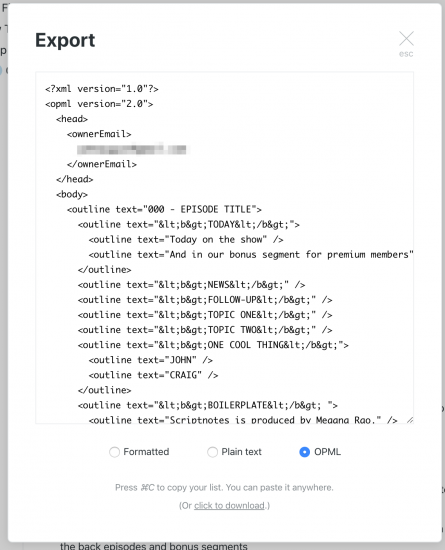
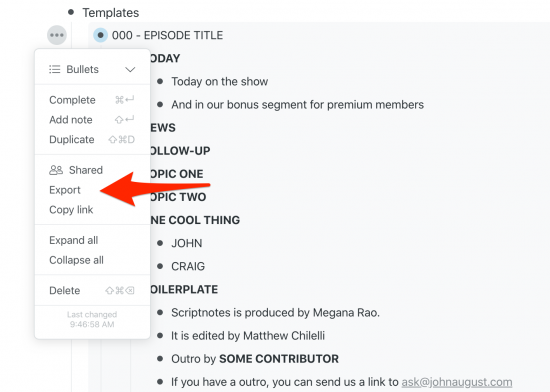
Naturally, I tried to Google a solution, but nothing turned up. So I experimented with different options. It turns out the trick is to Export the template (using the three-dot menu on the left) and choose OMPL as the format.

workflowy export

You get text that looks like this:

workflowy opml

A mess, right? But it works.

Copy-paste it into TextExpander. When expanded into WorkFlowy, it’ll be properly indented and formatted.

For the record, the amount of time I spent figuring out and blogging this time-saving technique is now probably a wash.

« Previous Page
Next Page »

Primary Sidebar

Newsletter

Inneresting Logo A Quote-Unquote Newsletter about Writing
Read Now

Explore

Projects

  • Aladdin (1)
  • Arlo Finch (27)
  • Big Fish (88)
  • Birdigo (2)
  • Charlie (39)
  • Charlie's Angels (16)
  • Chosen (2)
  • Corpse Bride (9)
  • Dead Projects (18)
  • Frankenweenie (10)
  • Go (29)
  • Karateka (4)
  • Monsterpocalypse (3)
  • One Hit Kill (6)
  • Ops (6)
  • Preacher (2)
  • Prince of Persia (13)
  • Shazam (6)
  • Snake People (6)
  • Tarzan (5)
  • The Nines (118)
  • The Remnants (12)
  • The Variant (22)

Apps

  • Bronson (14)
  • FDX Reader (11)
  • Fountain (32)
  • Highland (75)
  • Less IMDb (4)
  • Weekend Read (64)

Recommended Reading

  • First Person (87)
  • Geek Alert (151)
  • WGA (162)
  • Workspace (19)

Screenwriting Q&A

  • Adaptation (65)
  • Directors (90)
  • Education (49)
  • Film Industry (489)
  • Formatting (128)
  • Genres (89)
  • Glossary (6)
  • Pitches (29)
  • Producers (59)
  • Psych 101 (118)
  • Rights and Copyright (96)
  • So-Called Experts (47)
  • Story and Plot (170)
  • Television (165)
  • Treatments (21)
  • Words on the page (238)
  • Writing Process (177)

More screenwriting Q&A at screenwriting.io

© 2026 John August — All Rights Reserved.