• Skip to primary navigation
  • Skip to main content
  • Skip to primary sidebar

John August

  • Arlo Finch
  • Scriptnotes
  • Library
  • Store
  • About

flagged

Austin Film Festival schedule

October 5, 2006 News

In case any readers want to see how much less articulate I am in person, I’ll be speaking on three panels at the upcoming Austin Film Festival. Here are the descriptions the organizers sent out:

The Art of the Pitch
SFA Hotel, Assembly Room
Oct. 19th, 2:45 p.m. – 4 p.m.

Pitching yourself is as important as pitching your script, and it often happens at parties, in elevators, and, of course, at festivals and conferences. Come learn how to hard pitch in a meeting and soft pitch in a casual setting and make sure your pitch leaves people wanting to get their hands on your script.

  • John August
  • Jessica Bendinger
  • Maggie Biggar
  • Alex Smith – moderator

Getting a Writing Job
Driskill Hotel, Maximilian Room
Oct. 20th, 10:45 a.m. – 12 p.m.

Inspired by John August’s Web site, this is the panel formerly known as Breaking Into the Business. Why did we change the name? Because what most writers really want to know is, “How can I get paid for my writing? How do I become a professional writer?” It’s important to know there isn’t just one path to success.

  • John August
  • Brendan McDonald
  • Gregg Rounds
  • Greg Beal – moderator

Tell Your Story
Driskill Hotel, Chisolm Trail Room
Oct. 20th, 3:15 p.m. – 4:30 p.m.

Come and meet John August, writer of Charlie and the Chocolate Factory, Corpse Bride, Big Fish, Charlie’s Angels, Go, and others, in a relaxed and intimate setting. Get here early and join the casual conversation on the couch.

Macworld review of Montage

October 2, 2006 Software

Macworld has a review of Mariner Software’s Montage, which is pretty much right on the money. They give it two out of five mice, admiring its interface while pointing out that it doesn’t do nearly as much as it should: page locking, scene numbering and many other standard features are still on the drawing board. Which is fine for a beta, but not a shipping product.

I like the Montage folks, and have been in e-mail contact with them about an even more fundamental issue for me — the way it handles dialogue across page breaks. They’ve been responsive, and seem to genuinely want to make a great application. Version 2 — or even 1.5 — might be terrific. Right now, Montage is a program that looks finished but isn’t.

I’ve moved beyond hoping for a Final Draft killer — the next version of Screenwriter should do that, assuming it ever ships. But competition breeds innovation, so I’ll always be watching Montage, Celtx and the other upstarts. One of them might just change the game.

ControllerMate and automatic fingers

September 5, 2006 Geek Alert

geek alertI recently upgraded to a Mac Pro, which I justified to myself thusly:
  1. I’m doing effects for The Movie, and Motion runs much faster on it. (In truth, I only did one effect in the final cut.)
  2. My G5 was actually slower than my laptop.
  3. As a writer, I needed a quieter computer.
  4. I deserve to throw some of my Hollywood money around.

The new computer is great, and almost all of my software works perfectly on it. Unfortunately, I’ve had some hiccups with my input devices.

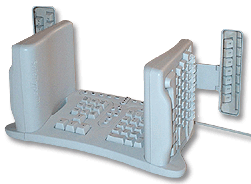
keyboardAs I’ve blogged about, I have a strange keyboard. It looks impossible to use, but I’m actually much faster typing on it than a traditional keyboard, with the added bonus that my arms don’t go numb in the middle of the night.

The Mac Pro isn’t thrilled with my keyboard, which connects through a serial-to-ADB dongle. On restarts, the computer asks me to confirm the keyboard layout, suspicious that I’ve swapped in a Klingon model. Nevertheless, it produces the correct letters every time.

While my odd keyboard is great for typing, it’s singularly awful for key commands, like Copy, Paste and Undo. While one’s fingers can always find the right keys to form words, there’s something different about multi-key combinations. It just doesn’t happen consistently.

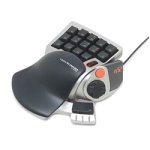
nostromo keypadThat’s why I’ve been using a little gaming keypad, the Nostromo N52 by Belkin. Using the software that came with it, I set up keys for Copy, Paste and all the useful shortcuts one is likely to use. With my right hand on the mouse, and my left on the Nostromo, I’m an editing machine.

But the software for the Nostromo refuses to work with the Mac Pro.

At first, I wondered if I could live without it. I thought my fingers would stop reaching for the non-functioning keypad, but they wouldn’t. Thinking I was copying something, I’d be left with a single lower-case g, which is how the computer decided to interpret the chatter from the orphaned device.

Belkin hasn’t upgraded the drivers in years, so I’m not holding my breath that there will suddenly be a new version for Intel Macs like mine. One guy has taken it upon himself to create his own drivers, but it looks like even he’s given up.

Fortunately, there’s a program called ControllerMate which can handle the Nostromo. For $15, it’s almost as good as free, and can do a lot of things that the Belkin software couldn’t. Like confound the hell out of me.

ControllerMate has an elaborate flow-chart-style programming language which looks great but is almost impenetrable. How do you assign a keystroke to a button? It’s as easy as…

  1. Pick the controller from the list.
  2. Double-click it to open the available controller buttons.
  3. Press the actual button on the device to indicate which virtual button it corresponds to.
  4. Drag the virtual button to the programming area.
  5. But first, you might want to make a new programming page. Or a group. Why? You won’t know until you need it.
  6. Now, pull down the menu to outputs, and select “Keystroke” or “Single Key.” What’s the difference? I couldn’t tell you, except that Single Key seems to work and Keystroke locked up my machine in a beeping loop.
  7. Open the virtual keyboard palette and drag the desired key to the well, then add any modifier keys.
  8. Then drag the whole thing to the programming area, and attach it to the virtual button.
  9. Test to see if it works.

Repeat for all of the other keys. Uggh.

To be fair, there’s a benefit to all this abstraction. You can create some pretty elaborate logic by nesting groups and pages, so that hitting one key while another key is pressed performs a special function. But it’s a lot of work to get to Copy and Paste.

My fingers are just happy to be back on autopilot. Just in the course of writing and posting this blog, they’ll have reached for the Nostromo fifteen times. Which is fifteen times less I’ve had to curse under my breath.

Additional photography

August 22, 2006 Los Angeles, Projects, The Nines

filmmingIn Hollywood parlance, “additional photography” is the polite term for what used to be called reshoots. It’s a rare case where the new word is better. Most of the time, you’re not reshooting anything. You’re getting new things you didn’t know you needed the first time around.

Woody Allen is famous for requiring additional days in his schedule (and budget) to allow for a different performance, a new scene, a funnier joke. Given how expensive a day of shooting is, that seems like a luxury, but as screenwriters it really shouldn’t. We’re accustomed to going through multiple drafts, trying things that might be Really Bad Ideas.

The chance to fuck up and fix it can be the difference between a so-so and solid.

I can speak from first-hand experience. For Go, we went back and shot several new scenes, including the resolution of the Simon-Gaines-Claire-Vics plotline. On paper, the new version wasn’t any better — in fact, it made considerably less sense. But as shot, it just worked better, condensing several scenes down to one, and wrapping up the movie faster.

For the first Charlie’s Angels, our additional photography was much more limited, basically just new establishing shots. But having seen the test scores for both the Before and After versions, I can testify to how much difference a few seconds of film can make. In most cases, it’s not that you’re adding something great, but rather that you’re replacing something sucky.

Last week, I was back in the director’s chair for additional photography on The Movie. It was only two days of shooting, but we added two new scenes, and got needed bits for three other sequences.

After seven weeks of editing, the strange thing about going back into production is that, well, it’s production. It means re-opening the production office, and hiring a crew of 45. If you’re lucky, you can hire the same crew who worked on the film the first time around. More likely, however, those people will have moved on to other productions, so you end up hiring a largely new crew. In our case, almost half of the crew who worked on these two days had no idea what The Movie was even about. That’s the remarkable thing about the below-the-line trades in Hollywood: because of how specifically the jobs are defined, they’re largely plug-and-play. The gaffer and key grip may have never met, but together they can light your scene. They don’t need to know why the scene is happening, just where the Chimera is supposed to be.

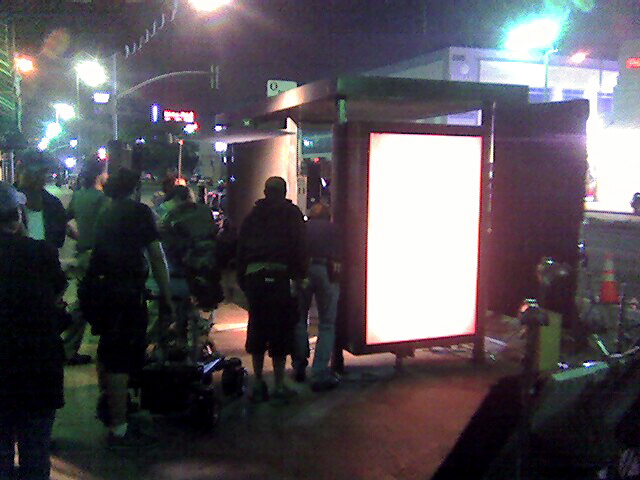
accebit posterThe bulk of our art department came from Veronica Mars, which has been back in production for over a month. Since the original crew wasn’t available, I got to rock my inner design geek and handle the printed graphics myself, something I haven’t done since college.

The “accebit” poster hangs at a Metro bus stop on Wilshire Blvd. Yes, it means something, so you classics majors can get to work.

This was our first time shooting night exterior, which meant new decisions about how we wanted things to look. Personally, I’m a big fan of very black skies — think high school football movies — so we aimed for that. We also aimed at finishing before 3 a.m. We came close.

Next step? Test screening, picture lock, then sound-a-palooza.

« Previous Page
Next Page »

Primary Sidebar

Newsletter

Inneresting Logo A Quote-Unquote Newsletter about Writing
Read Now

Explore

Projects

  • Aladdin (1)
  • Arlo Finch (27)
  • Big Fish (88)
  • Birdigo (2)
  • Charlie (39)
  • Charlie's Angels (16)
  • Chosen (2)
  • Corpse Bride (9)
  • Dead Projects (18)
  • Frankenweenie (10)
  • Go (29)
  • Karateka (4)
  • Monsterpocalypse (3)
  • One Hit Kill (6)
  • Ops (6)
  • Preacher (2)
  • Prince of Persia (13)
  • Shazam (6)
  • Snake People (6)
  • Tarzan (5)
  • The Nines (118)
  • The Remnants (12)
  • The Variant (22)

Apps

  • Bronson (14)
  • FDX Reader (11)
  • Fountain (32)
  • Highland (75)
  • Less IMDb (4)
  • Weekend Read (64)

Recommended Reading

  • First Person (87)
  • Geek Alert (151)
  • WGA (162)
  • Workspace (19)

Screenwriting Q&A

  • Adaptation (65)
  • Directors (90)
  • Education (49)
  • Film Industry (489)
  • Formatting (128)
  • Genres (89)
  • Glossary (6)
  • Pitches (29)
  • Producers (59)
  • Psych 101 (118)
  • Rights and Copyright (96)
  • So-Called Experts (47)
  • Story and Plot (170)
  • Television (165)
  • Treatments (21)
  • Words on the page (238)
  • Writing Process (177)

More screenwriting Q&A at screenwriting.io

© 2026 John August — All Rights Reserved.