• Skip to primary navigation
  • Skip to main content
  • Skip to primary sidebar

John August

  • Arlo Finch
  • Scriptnotes
  • Library
  • Store
  • About

fixed

Finding movies online, legally

September 25, 2009 Geek Alert, Video

Toby Wilkins had emailed me about this weeks ago, but I just now got a chance to check it out.

SpeedCine indexes movies available through iTunes, Crackle, Hulu and Amazon VOD, letting you know where you can find any given title. For example, searching for the The Nines provides links for download through Amazon, iTunes and NetFlix.

Because most of these services are U.S.-only, it’s not much help to international users, unfortunately.

The site is still in beta, and while it’s really useful, I wish it provided better URLs for copy-and-pasting. Right now, SpeedCine gives you a jumble of letters after an ASP query. Here’s the listing for Go in SpeedCine:


http://www.speedcine.com/results.aspx?query=T0001274

and here it is on Crackle:


http://crackle.com/c/GO

That’s small enough to be easily Twittered, and feels permanent enough that I’d be comfortable putting it in a blog post.

But that’s a small quibble. SpeedCine is worth making your first stop when trying to find a movie online.

Update March 2011: SpeedCine has closed.
Adobe Story, an early look

September 22, 2009 Screenwriting Software

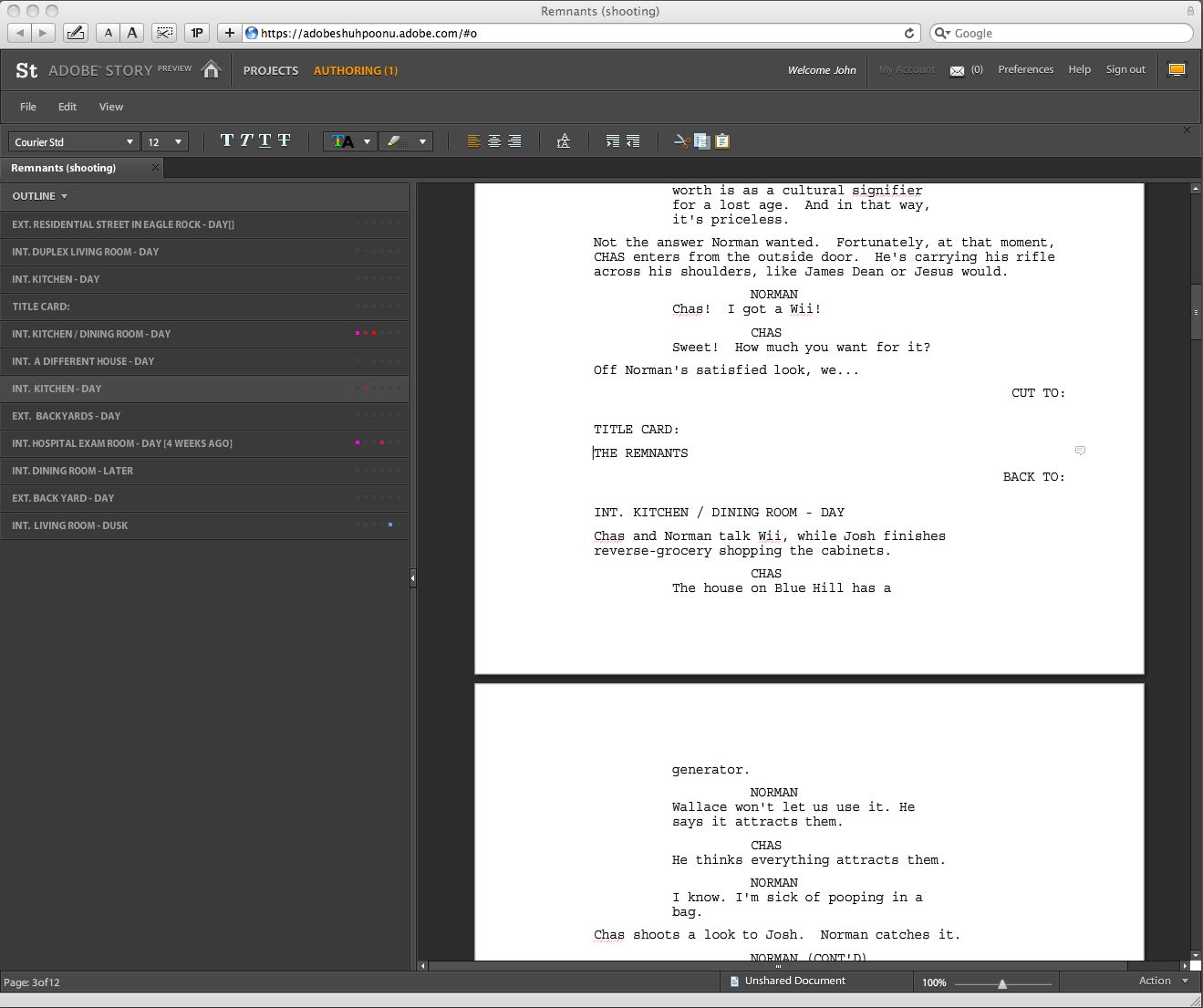
Reader Andrew pointed me to the preview version of Adobe Story, the new screenwriting application that’s designed to work with Adobe’s Creative Suite.

It’s Flash-based and runs in the browser (or via Air), but does a credible job duplicating most of what you’d expect from a traditional desktop application.

screenshot

Story is definitely a work-in-progress, so it’s not fair to compare it to the dominant players in the field. In its current form, it flubs some fundamentals like drag-and-drop and keeping blocks of dialogue together.

But while you wouldn’t use it for Actual Work yet, Story does some clever things that are worth calling out.

  • Story tries to identify which characters are in a scene, and uses colored-coded dots to mark them in the outline.
  • The highlighter is really a highlighter, changing the background of text.

  • Full-screen looks good, with everything but the page itself nice and dark.

  • Find and Replace is simply a toolbar in the same window.

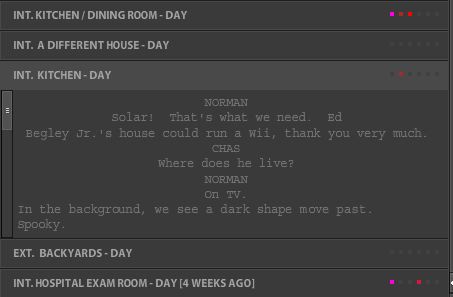
  • Single-clicking a scene header in the outline expands it to a compressed, scrollable version of the scene, so you can check something without losing your place in the script. (Double-clicking a scene header jumps you to that scene.)

screenshot

I wish Story well. Competition is good, and a company like Adobe has the resources and experience to keep plugging at it. Yet I have a hard time envisioning it capturing a lot of ground.

Its text handling is strange, probably a result of its Flash origin. No doubt a lot of that can be remedied, but one of the consequences of platform-independence is that a web application is never going to act quite like a Windows one or a Mac one. With something as basic as text, I don’t want to have to consciously anticipate what’s going to happen if I try to select a word. Just work.

My other concerns are more philosophical. When the public preview of a screenwriting application lets dialogue spill across page breaks, I get nervous that its developers really don’t understand the format. Properly handling dialogue isn’t a feature; it’s a fundamental.

The preview version of Story does a good job importing and exporting. I didn’t test out the sharing and version-tracking features, but web-based software has a definite advantage here, and if Story is to make real inroads, it will probably be in this area. For writing teams, this can be very helpful.

I’ll be looking forward to seeing what Adobe does next with Story.

ADDED: Whenever I write about screenwriting software, the first questions are about what application I use. I alternate between Final Draft 8 and Screenwriter 6, with no strong preference between the two. I have also tried Celtx, Scrivener and Montage, but haven’t found them adequate for my work.

Blogs and baked goods

September 8, 2009 Geek Alert, Meta

It’s not that hard to make bread. You simply need the right combination of flour, yeast and water, plus an oven to cook it in. With a little work, you can end up with a delicious loaf most of the time. Plus, you can customize the recipe to exactly your taste.

So why doesn’t everyone make their own bread?

Because it’s a kind of pain in the ass. A lot of things can go wrong, leaving you with a blob of sticky dough. It takes time. It requires bowls and pans that have to be washed, plus an oven that heats up your kitchen. And truth be told, most people aren’t exactly Nancy Silverton.

All in all, it’s much easier to buy a loaf at the store.

Blogs are like bread.

To make a blog, you need something to write about, plus software and hardware to put it on the web. ((Countless blogs are started without the “something to write about” part figured out, which is usually why they go dead after three weeks.))

When I first launched johnaugust.com in 2003, I assembled everything on my own computer, then uploaded it to a shared host. In baker parlance, I mixed the dough in my own bowls, then carried it down the street to the community oven to bake it. I was outsourcing the expensive hardware.

By 2004, I outsourced most of the software as well, running Movable Type on the shared server. Later that year, I switched to WordPress, which has continued to run the site ever since.

I like WordPress a lot. It’s remarkably easy to install and theme. It’s powerful and flexible. It has an extremely active development community, so if there’s a feature you’d like, someone’s probably already built it. ((This weekend, I installed a plugin
that automatically sends a backup of the site to my Gmail account. Total time: five minutes.))

But make no mistake: you’re still baking your own bread. Things can go wrong. Really, really wrong. And when they do, it’s a lot of work to fix it. A bad loaf of bread is disappointing. A bad error in your database can be catastrophic.

Over the weekend, there was a lot of uproar about a worm attack on WordPress installations that wrecked some notable blogs. Amid the sometimes-smug observations by the unaffected, I found one point that needs to be elevated to basic principle:

Most people shouldn’t be running their own blogging software.

Services like Tumblr, Posterous and Blogger are excellent and free. WordPress.com, the hosted version of WordPress, gives you 90% of the benefits with none of the hassle.

In 2003, I had to run my own software. There was no choice. But if I were starting a blog from scratch today, I would do it on one of these services. ((Also over the weekend, I nuked a few stray WordPress installations that had gone fallow. One of the pitfalls of WP’s easy installation process is that it’s tempting to throw up a site to test a concept. A year later, that mostly-empty blog is an attractive nuisance. I suspect that 80%+ of WP installations fall into this category. I’d propose the install scripts like Fantastico default to closed comments and randomized admin usernames.))

Some people like making bread.

For all the hassles, there are some benefits to doing things yourself. Just like the artisanal baker can tinker with a recipe, the self-hosted blogger can tweak things just to his liking. He also has more control over his content — some services make it difficult to migrate.

In a month or two, I’ll be launching a revamped version of this site, which will continue to use WordPress. That means I’ll have to keep up with security updates, backups and a lot of general troubleshooting. There will be more worm attacks and self-inflicted wounds. I’ve decided it’s worth it. For most folks, it’s probably not.

If you’re considering starting a blog, ask yourself whether you really want to bake your own bread. Odds are, you probably just want a sandwich. Buy a loaf and get to it.

What an undergrad degree is worth

September 4, 2009 Education

From today’s USA Today:

Darla Horn, 26, acknowledges she didn’t give much thought to the cost of college when she enrolled at State University of New York in Purchase. […] Because she didn’t qualify for financial aid, she took out student loans, graduating in 2005 with a double major in journalism and anthropology and more than $80,000 in debt.

That’s way too much debt for an anthro-journalist. But is it too much for an engineer? Is it too much for an actuary?

When I was buying a house, the rule of thumb was that you could afford a home three to four times your annual income. It feels like there should be an equivalent rule of thumb for how much you can spend on your education versus average salary of your studied profession. Or, hell, a web calculator.

In a few minutes of Googling, the closest I could find was this:

Don’t take out more student loans than what you expect to make in the first year. This rule of thumb puts a reasonable upper limit on how much in student loans you should take out, which is a good thing, but doesn’t paint the whole picture.

There are some jobs (like screenwriting) in which starting salary is almost impossible to predict, and others (like law) in which salary goes up quickly based on experience. But rules of thumb are helpful because they simplify things, and this one seems a good start.

By this measure, an actuary could take out about $50,000 in loans, while an electrical engineer could feel okay taking on $55,000 in debt. Darla, meanwhile, should have capped her loans at $33,000. (All salary estimates from PayScale.)

What often gets lost in these discussions is that relatively few students end up paying full freight. For four-year, private American universities, the average tuition discount rate for fall 2007 was 39.1%. The price on the sticker isn’t necessarily the price you pay.

But if you’re looking to study a low-paying field, do Future You a favor by being honest about the cost.

« Previous Page
Next Page »

Primary Sidebar

Newsletter

Inneresting Logo A Quote-Unquote Newsletter about Writing
Read Now

Explore

Projects

  • Aladdin (1)
  • Arlo Finch (27)
  • Big Fish (88)
  • Birdigo (2)
  • Charlie (39)
  • Charlie's Angels (16)
  • Chosen (2)
  • Corpse Bride (9)
  • Dead Projects (18)
  • Frankenweenie (10)
  • Go (29)
  • Karateka (4)
  • Monsterpocalypse (3)
  • One Hit Kill (6)
  • Ops (6)
  • Preacher (2)
  • Prince of Persia (13)
  • Shazam (6)
  • Snake People (6)
  • Tarzan (5)
  • The Nines (118)
  • The Remnants (12)
  • The Variant (22)

Apps

  • Bronson (14)
  • FDX Reader (11)
  • Fountain (32)
  • Highland (75)
  • Less IMDb (4)
  • Weekend Read (64)

Recommended Reading

  • First Person (87)
  • Geek Alert (151)
  • WGA (162)
  • Workspace (19)

Screenwriting Q&A

  • Adaptation (65)
  • Directors (90)
  • Education (49)
  • Film Industry (489)
  • Formatting (128)
  • Genres (89)
  • Glossary (6)
  • Pitches (29)
  • Producers (59)
  • Psych 101 (118)
  • Rights and Copyright (96)
  • So-Called Experts (47)
  • Story and Plot (170)
  • Television (165)
  • Treatments (21)
  • Words on the page (238)
  • Writing Process (177)

More screenwriting Q&A at screenwriting.io

© 2026 John August — All Rights Reserved.