• Skip to primary navigation
  • Skip to main content
  • Skip to primary sidebar

John August

  • Arlo Finch
  • Scriptnotes
  • Library
  • Store
  • About

John

Formatting a montage in Highland using Forced Action

October 24, 2015 Apps, Formatting, Fountain, Highland, Screenwriting Software

A friend was writing a montage today and couldn’t figure out how to get quite the formatting he wanted in Highland:

If I’m moving quickly in a sequence I’ll frequently write IN THE GARAGE or BACK OUTSIDE or instead of a whole slug line. I want action to go on the next line, with no blank line in between.

The problem is, it’s interpreting this as a character name, and formats it as such, and the action beneath it as dialogue.

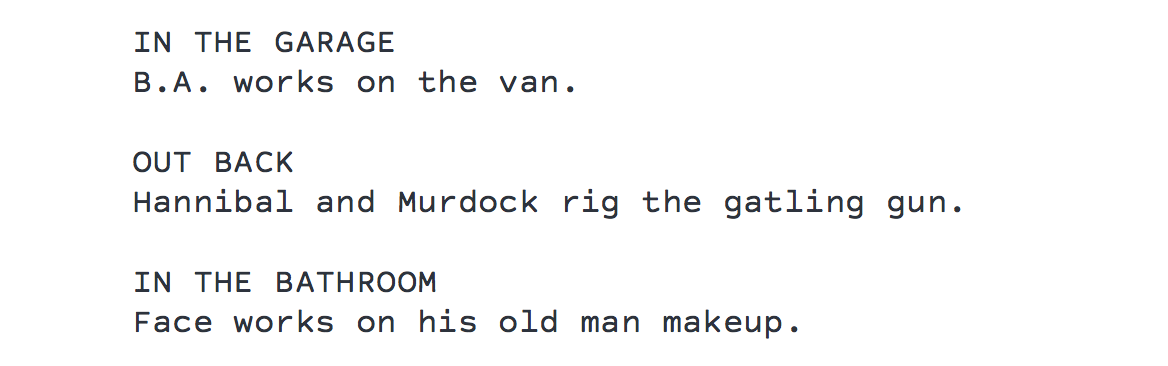
He wrote something like this:
forced action screenshot
In Fountain syntax, that looks like three blocks of dialogue, so Highland was giving him this:

IN THE GARAGE

B.A. works on the van.

OUT BACK

Hannibal and Murdock rig the gatling gun.

IN THE BATHROOM

Face works on his old man makeup.

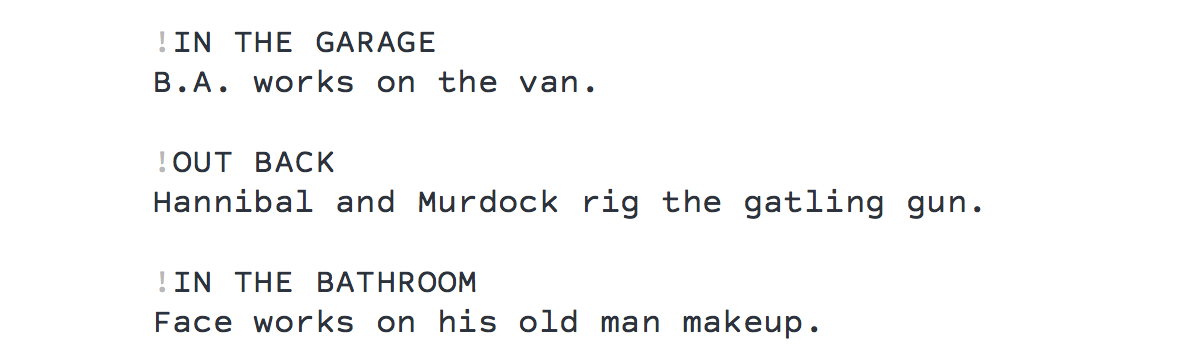
Fortunately, Fountain has ways to override defaults. In this case, the easiest way to get his desired format would be to force those intermediary sluglines (“IN THE GARAGE,” “OUT BACK,” etc.) to be treated as action.

To do that, start each of them with an exclamation point.
forced action screenshot 2
That keeps Highland from interpreting the uppercase lines as character names, leaving the lines neatly stacked up, just like my friend wanted.

In most cases, you’ll never need to do this, because you’ll generally want the blank line after the “IN THE GARAGE” or “OUT BACK.” Leaving a little more white space on the page helps the reader understand that you’re moving between multiple locations.

Here’s an example from Ted Griffin’s Ocean 11 screenplay:

And during the above rant by Benedict, we view...

MIRADOR SUITE

now empty, Livingston’s monitors still displaying the masked men in the vault.

WHITE VAN

navigating the streets of Las Vegas.

FIVE SEDANS

tailing the van, security goons piled into each, and maybe we NOTICE (or maybe not) the Rolls-Royce tailing them.

TESS

pacing in Benedict’s suite, biting her nails, debating whether to blow the whistle on Danny. ON TV: a newscast of the contentious aftermath of the prize fight.

UZI GUARDS,

bound and unarmed, unconscious to the activity within the vault.

RUSTY’S CELL PHONE

opened and unmanned.

BENEDICT

listens -- the line has gone dead. He hangs up.

The forced action trick can be useful in other cases where you want to override default behavior.

Perhaps you have a time bomb, and you’re using ellipses to indicate the countdown. You write:

screenshot

Highland reads that third tick as a forced scene header, because it starts with a single period. But you can force it back to action with an exclamation point:

illustration-

Both Highland and Fountain are sophisticated enough to catch most edge cases, but we’re always finding new situations in which writers are trying to do something that doesn’t quite match expected behavior. And that’s okay! The screenplay format is a set of shared assumptions, not a straightjacket. If you really need to include something unusual, do it. ((Both Fountain and Highland support extended character sets, including emoji. Final Draft doesn’t.))

You can find all of the possible forced elements in the Syntax section of Fountain.io, most of which are supported by the popular apps. (Forced Action wasn’t part of the original spec, so some early apps haven’t included it yet.)

As always, you can find Highland on the Mac App Store.

Apprenticeship 101

October 21, 2015 Film Industry

Jana Kinsman worked as an apprentice beekeeper and goat-tender, but a lot of her advice applies well to anyone in their first job:

This isn’t your chance to prove yourself in a grandiose way. Your mentor isn’t expecting you to suddenly make their lives easier, they’re not looking for a hero or someone to throw themselves over the puddle where they’re about to walk.

This is not your opportunity to change their system or their workspace or their routine. I’ve worked with many mentors whose way of doing things was an absolute trainwreck. Inefficiencies galore, messes, unfinished projects EVERYWHERE. But it was never my responsibility to point it out to them.

When I started working in Hollywood — first as a reader, later as an assistant — I didn’t know what I was doing. I observed and tried to figure out what needed to be done, and asked as many questions as I needed to.

I quietly watched how my bosses worked, not because I wanted to become them, but because I wanted to understand how they made decisions, and how they fit into the bigger picture of the industry.

Kinsman concurs:

I tell people that some of the most valuable things I learned from working with mentors have been examples of how I don’t want to do things. It’s not about forcing yourself into thinking your mentor is a flawless human with a perfect way of doing things, it’s seeing their flaws and their inefficient systems and accepting them for who they are.

Often times this will give you a chance to put yourself in their shoes and look at your own future realistically: If you were doing what they were doing for as long as they’ve been doing it, would you be perfect?

You eventually realize that everyone is doing the best they can, just like you. The difference is experience, and the only way to get it is to do the work.

What went right and what could have gone better with Writer Emergency Pack

October 15, 2015 Follow Up, Writer Emergency Pack

This week is the one year anniversary of Writer Emergency Pack. I wrote about it at our newly-redesigned site:

It was a test deck, full of typos and formatting errors, but it felt like something worth pursuing.

I showed the prototype to screenwriter friends, soliciting their feedback. I took several decks to the Austin Film Festival, passing them around during the live Scriptnotes session.

On November 3rd, we launched our Kickstarter campaign for Writer Emergency Pack. Within an hour, we were fully funded. Within days, it was clear we were onto something big.

We ended up with 5,714 backers, making us the most-backed card project in Kickstarter history. ((Oh, yeah: Exploding Kittens. That happened later.))

I originally wrote up the blog post as a look-how-far-we’ve-come retrospective, charting how in 12 months we went from an idea to shipping thousands of decks to writers and schools around the world. Basically, “Hooray for us!”

But writing is a process of discovery, and sometimes it forces you to question your central thesis.

Yes, things went well. But they could have gone better.

It’s easy to imagine an alternate history in which Writer Emergency Pack reached a bigger post-Kickstarter audience through better marketing and retail partnerships:

Every time I’m in a bookstore, I see a spot where Writer Emergency Pack would fit. Sometimes it’s on a shelf near the writing books. Other times, it’s near the register. But we’re not there, because we simply haven’t committed the time and resources to figuring it out.

We’ve had conversations with some smart retail folks, and even a tentative discussion with a potential publisher/distributor. But we’ve never gotten past talking.

The good thing about missed opportunities is that most of them are still out there. We can improve our marketing, retail and international distribution. The question is how. I’ve outlined some of what we’re thinking, but I’d encourage you to offer your own suggestions.

More than anything, I’d recommend writing up honest recaps of how things are going in your life. The process is cathartic and useful.

So often, we’re presenting sanitized versions of events in Christmas letters, or context-less status updates on Facebook. Writing up the longer version helps make sense of recent history, and offers suggestions for where you want to head next. Even if you never share what you write, putting words to these thoughts helps focus your attention in useful ways.

You can take a look at my full write-up on Writer Emergency Pack here.

Switching from Final Draft to Highland

October 8, 2015 Apps, Fountain, Highland, Screenwriting Software

The Other Sam Cooke writes about switching from Final Draft to Highland:

After about 10 months of using the application, I can honestly say that Highland is not merely an affordable screenwriting application; it’s actually my favorite screenwriting application.

Cooke likes that he can write on the go using any plain-text editor (he prefers Editorial). When he’s back on his Mac, Highland stays out of his way and lets him focus on the words:

Most screenwriting apps, like Final Draft, have you build a document that looks like [the finished version] as you go along. So I constantly have to hit Tab a certain number of times, or Enter a certain number of times, or type in a little shortcut throughout the writing process to get my script to look like that, and because it requires such constant attention, I find myself devoting too much thought to the formatting of my document.

It’s not particularly difficult to learn Final Draft, and I imagine plenty of people don’t find it as distracting as I do, but I feel like formatting should be an after-the-fact concern. I don’t want to have to think about it while I’m creating.

One other advantage Cooke cites: Final Draft is $250, while Highland is $30 on the Mac App Store.

« Previous Page
Next Page »

Primary Sidebar

Newsletter

Inneresting Logo A Quote-Unquote Newsletter about Writing
Read Now

Explore

Projects

  • Aladdin (1)
  • Arlo Finch (27)
  • Big Fish (88)
  • Birdigo (2)
  • Charlie (39)
  • Charlie's Angels (16)
  • Chosen (2)
  • Corpse Bride (9)
  • Dead Projects (18)
  • Frankenweenie (10)
  • Go (29)
  • Karateka (4)
  • Monsterpocalypse (3)
  • One Hit Kill (6)
  • Ops (6)
  • Preacher (2)
  • Prince of Persia (13)
  • Shazam (6)
  • Snake People (6)
  • Tarzan (5)
  • The Nines (118)
  • The Remnants (12)
  • The Variant (22)

Apps

  • Bronson (14)
  • FDX Reader (11)
  • Fountain (32)
  • Highland (75)
  • Less IMDb (4)
  • Weekend Read (64)

Recommended Reading

  • First Person (87)
  • Geek Alert (151)
  • WGA (162)
  • Workspace (19)

Screenwriting Q&A

  • Adaptation (65)
  • Directors (90)
  • Education (49)
  • Film Industry (489)
  • Formatting (128)
  • Genres (89)
  • Glossary (6)
  • Pitches (29)
  • Producers (59)
  • Psych 101 (118)
  • Rights and Copyright (96)
  • So-Called Experts (47)
  • Story and Plot (170)
  • Television (165)
  • Treatments (21)
  • Words on the page (238)
  • Writing Process (177)

More screenwriting Q&A at screenwriting.io

© 2026 John August — All Rights Reserved.