• Skip to primary navigation
  • Skip to main content
  • Skip to primary sidebar

John August

  • Arlo Finch
  • Scriptnotes
  • Library
  • Store
  • About

John

Highland 2 is very fast on the new Macs

November 25, 2020 Apps, Highland

Highland 2.9 runs natively on Apple’s speedy new M1 processor, the chip in its latest Macs.

Naturally, we wanted to see how much faster it runs on the new hardware. The challenge is that Highland 2 is already very, very fast. It’s hard to find an operation that takes long enough to measure with a stopwatch.

So we went back to an earlier challenge, looking at how long it takes to open Tolstoy’s War and Peace. Weighing in at more than 500,000 words, this plain text document is 4,132 pages long when formatted. When developing Highland 2, we used it as a test case because it’s literally 20 times longer than the average feature length screenplay. We figured if Highland could handle such a massive file, then it could handle any screenplay we threw at it.

In our 2018 test, we compared Highland 2’s performance against other word processors. Microsoft Word struggled, taking more than six minutes to open the file. Apple’s Pages fared better, at 47 seconds. Highland 2 opened it in just 9 seconds.

Computers have gotten faster, so we decided to evaluate performance on both an early 2020 Intel MacBook Air and the new M1 MacBook Air. We measured how long it took to open War and Peace and scroll to the bottom (to be certain it’s fully loaded).

2018 MacBook Pro 2020 MacBook Air 2020 MacBook Air M1
Highland 2 9s 6s 3s
Pages 47s 16s 9s
Word 6m 35s 4m 55s 3m 8s

This chart shows the results more clearly (shorter bars are better).
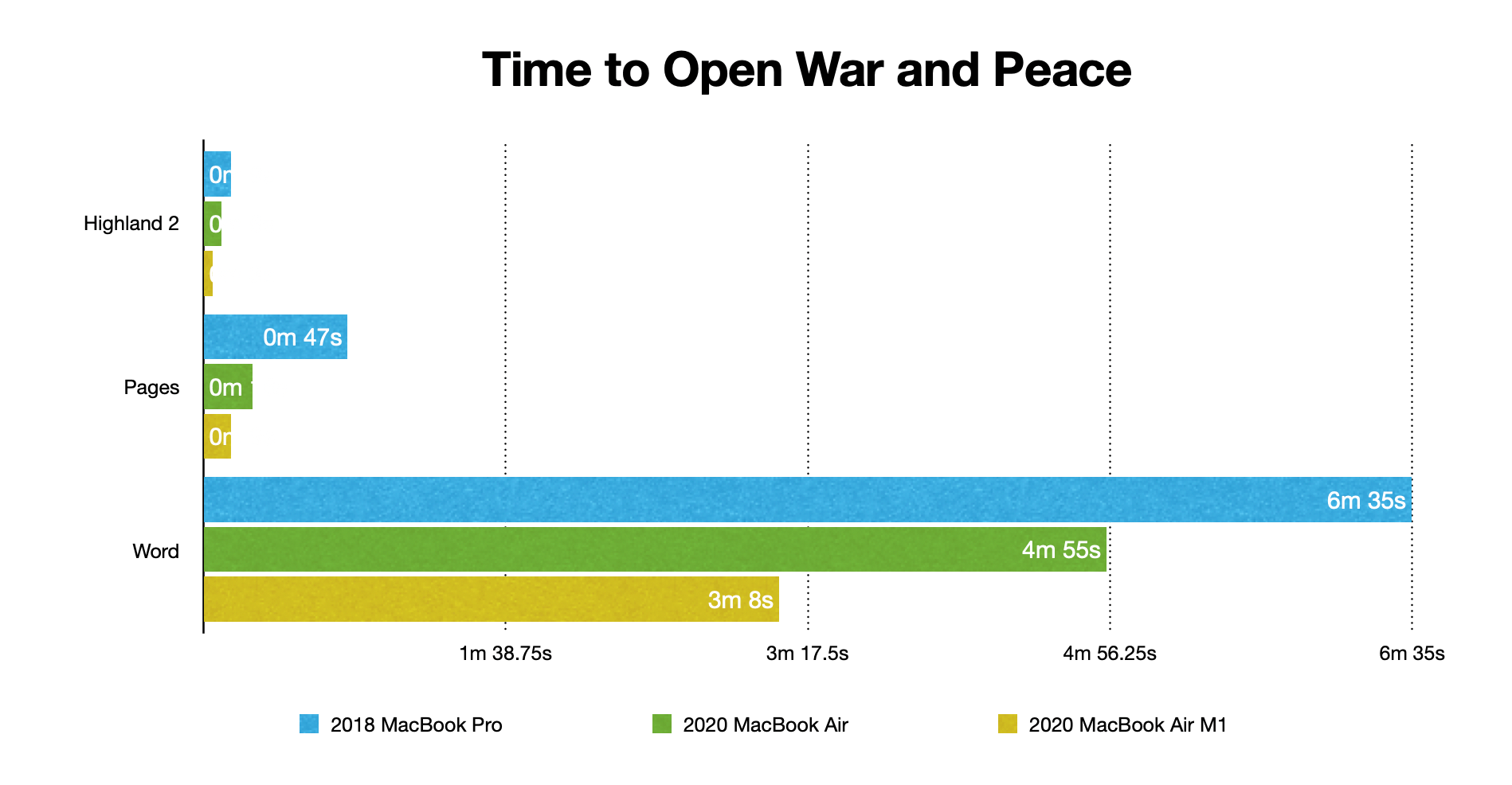
chart comaring speeds

Getting rid of Word makes the improvements to Highland and Pages more apparent.
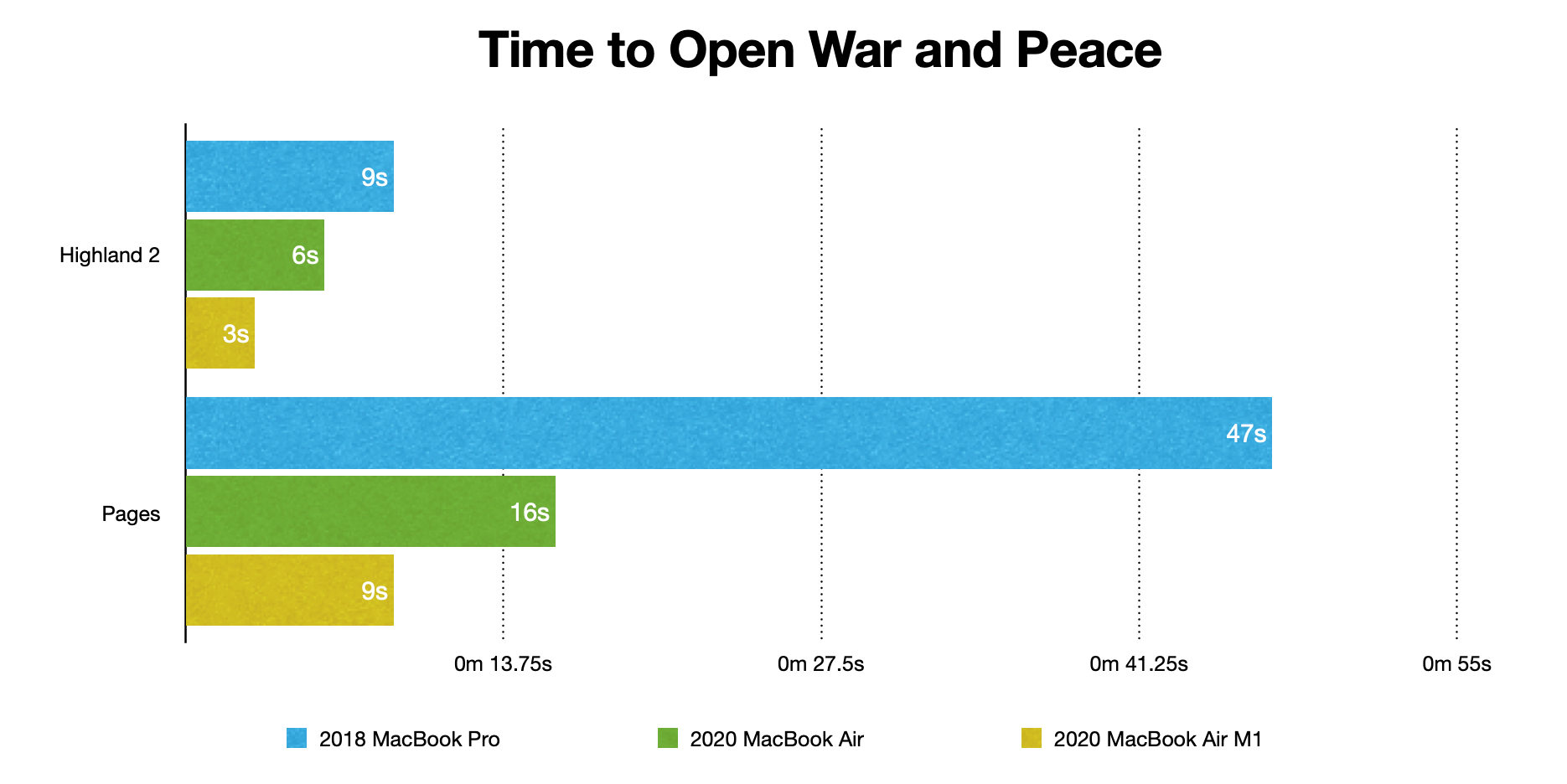
highland vs pages

Three seconds is honestly a bit conservative for Highland 2. As you can see in the video, we’re stopping the timer when we reach the bottom of the document, but it’s clearly already loaded.

Three takeaways:

  • The new Macs are faster for all three apps.
  • Word continues to be laughably slow for very long documents.
  • If you’re writing a sequel to War and Peace, Highland 2 is still your best bet. And it remains a fantastic choice for screenplays.

You can find Highland 2 on the Mac App Store.
Getting the Razer Tartarus Pro keyboard to work with macOS Catalina and beyond

November 7, 2020 Geek Alert, How-To, Tools

As I’ve written before, I use this weird keyboard which has helped greatly with my carpal tunnel issues.

While this odd keyboard is great for normal typing, certain key combinations are unwieldy. So for the past decade I’ve used an external gaming keypad to the left of my keyboard with custom macros set up for some common commands:

  • Select All
  • Undo
  • Copy
  • Cut
  • Paste
  • Paste and Match Style
  • Pasteboard History (which is part of Better Touch Tool)

When my beloved Logitech keypad crapped out, I switched to the well-reviewed Razer Tartarus Pro. It’s nicely built! Unfortunately, it doesn’t offer drivers for the current macOS.

After a lot of googling, I’ve cobbled together a solution. So in the interest of sharing what I’ve learned — and remembering how I got this to work in the first place — let me walk through the steps.

Note that this doesn’t do half of what a proper driver could accomplish, particularly for gaming. So please, Razer, make one! But if you want to use a gaming pad like the Tartarus Pro for keyboard shortcuts, this does the trick.

How to make the Tartarus Pro work on macOS Catalina

It’s important to understand that macOS sees the Tartarus Pro as a plain old keyboard. So if you plug it in and hit the 08 key, you’ll see it type a ‘w’.

Luckily, there’s software that can recognize that and do something useful instead.

Better Touch Tool is best known for getting random mice and trackpads to work, but it does a nice job on keyboards as well. (I’m using the 3.5 Alpha version.)

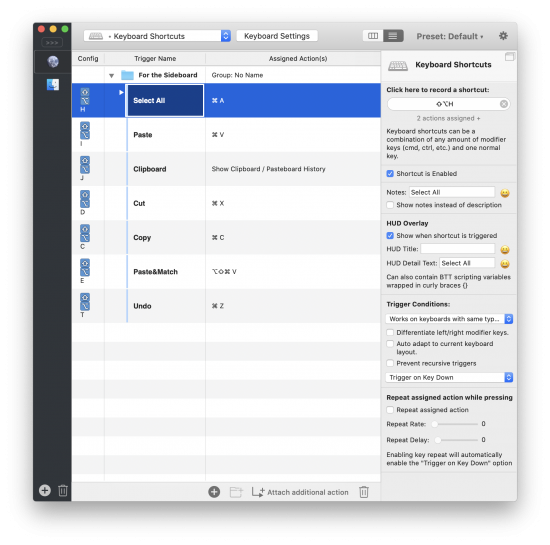
better touch tool setup

Let’s look at the Select All shortcut. You’ll notice the “Assigned Action” is ⌘A. Now direct your attention to the righthand sidebar. That’s where all the real work happens.

1) For the moment, ignore the “Click here to record a shortcut” section. We’ll come back to that.

2) You want the shortcut Enabled, so check the box.

3) You should put a note in this field for clarity.

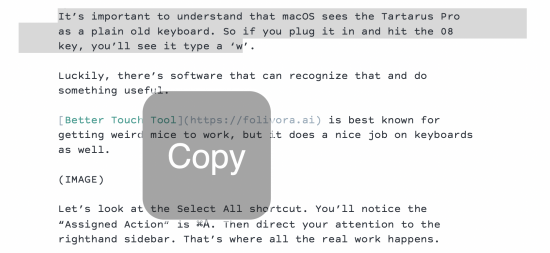
4) The HUD overlay is surprisingly helpful. It shows what’s happening, like that you just hit “copy.” I find the Title text to be too large, so I use the Subtitle instead.

HUD display shows Copy

5) For Trigger Conditions, you want to choose “Works on keyboards with the same type as used for recording.” Yes, this is a ridiculously long label.

6) You want it to Trigger on Key Down.

7) You don’t want it to repeat.

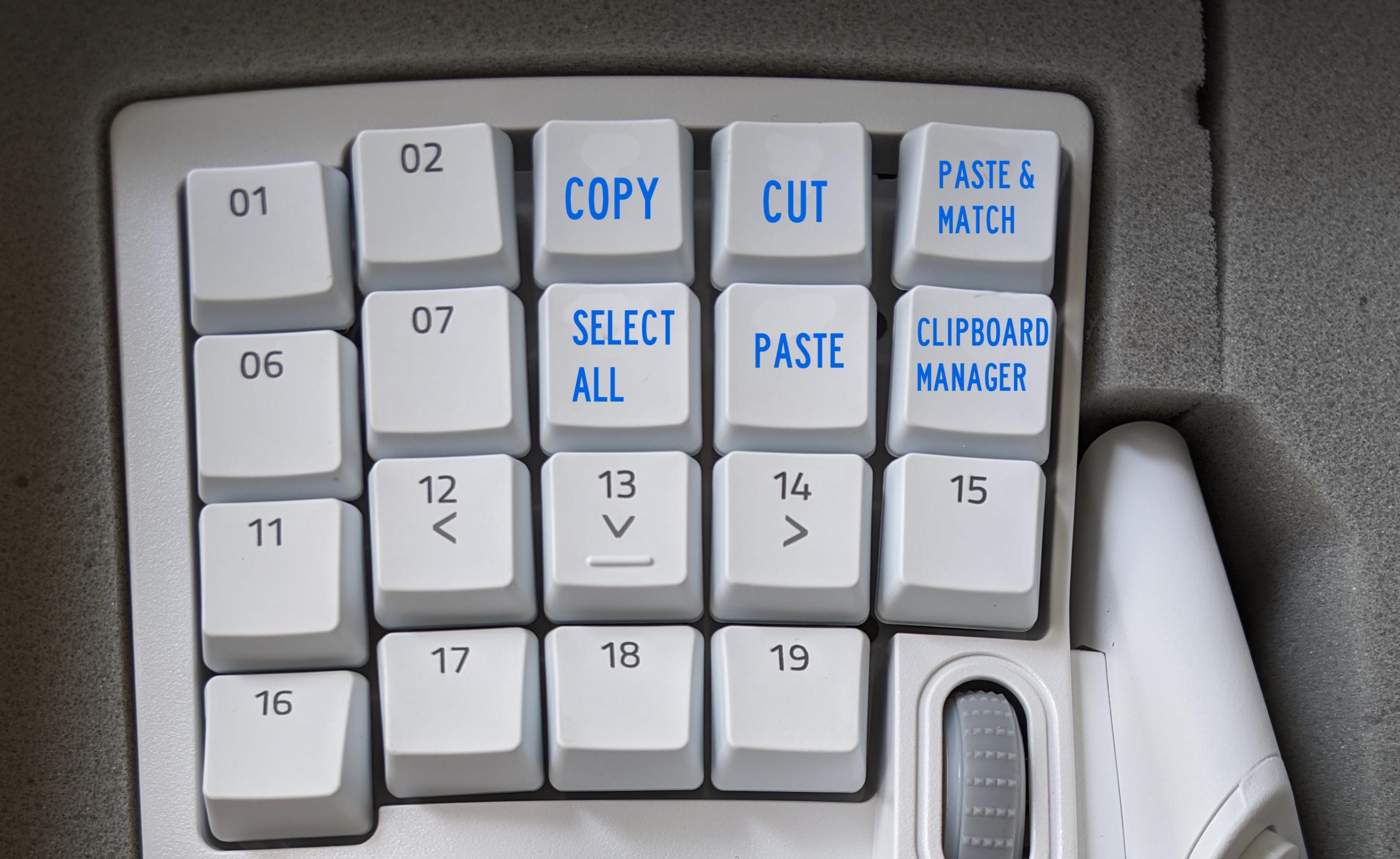
You’ll do these steps for each key on the gaming keypad you want to remap. Here’s my setup.

keyboard photo

I also set key 20, the spacebar, to Undo.

In theory, you’re done! For a few weeks, this worked great. And then it started having issues. When encountering password fields, my normal keyboard would start triggering keyboard shortcuts. I had to restart Better Touch Tool multiple times per day.

Basically, the app kept getting my normal weird keyboard confused with my special weird gaming keypad. I needed to call in the big guns.

Enter Karabiner

I’d long heard of Karabiner Elements, a public domain app that can remap any key and do really impressive things. But it’s intimidating as hell.

Here’s what I wanted Karabiner to do: remap the keys of the Tartarus Pro to seldom-used keystrokes so I could then set those as triggers for Better Touch Tool.

Looking through their user forums, I couldn’t find any perfect matches for this use case, but luckily @bradcurtis had built a set of custom mappings (a “complex modification” in Karabiner speak) for a similar purpose.

Installing them is odd. Here’s how you do it.

  1. Install Karabiner-Elements. You’ll have to give it a ton of permissions in System Preferences.
  2. In Karabiner-Elements Preferences, choose Complex Modications and then Add Rule.

  3. On the next screen, choose “Import More Rules from the internet.”

  4. Either search for “Tartarus” or follow this link

  5. Choose the Import button. It’ll ask you whether you want to open the link in Karabiner-Elements. You do.

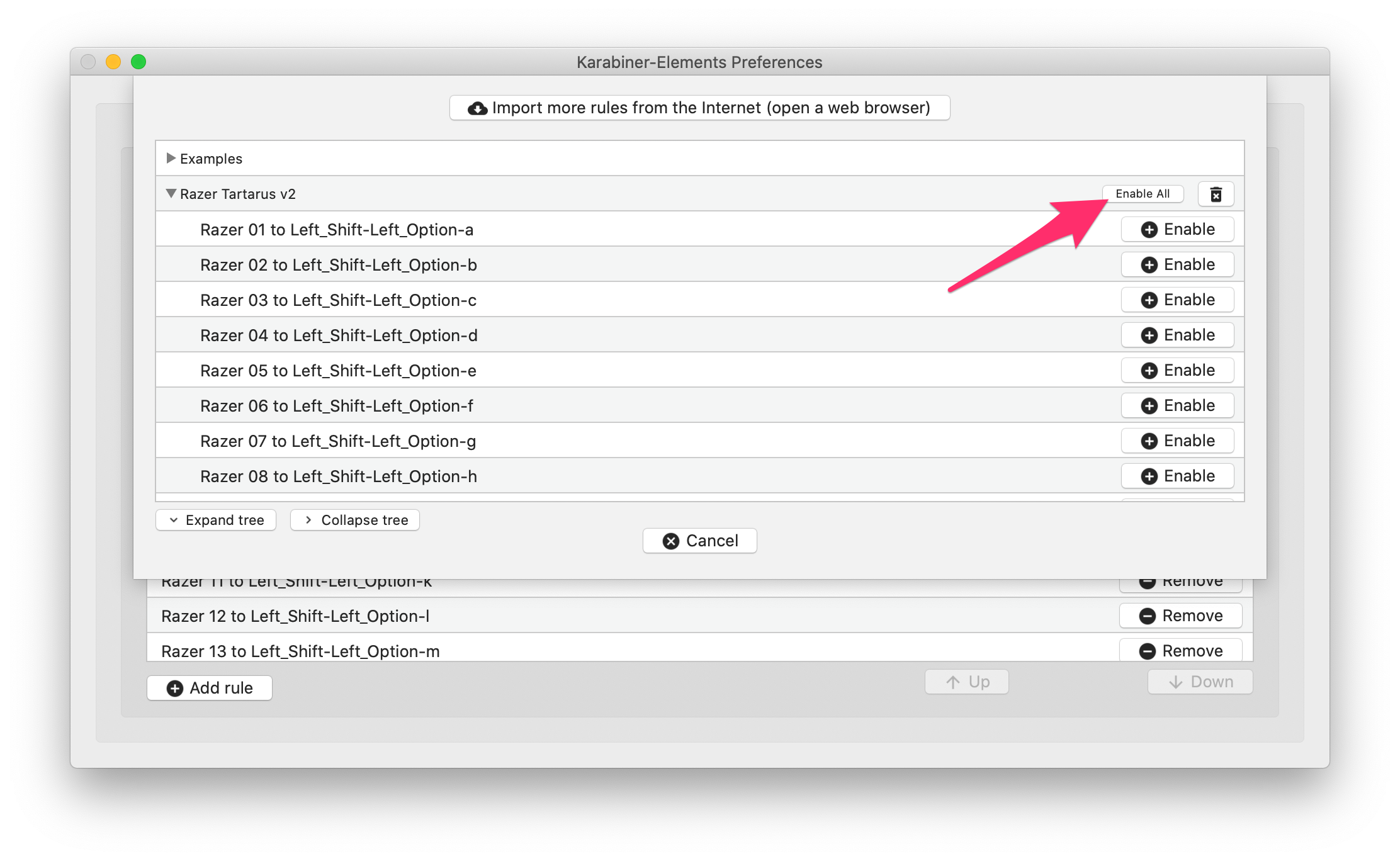
  6. Click the button to “Enable All”

Karabiner setup

If you have the Tartarus v2 like @bradcurtis, you’re done! All of the keys should be mapped to new, less-common keystrokes. But if you have the Tartarus Pro like I do, you need to modify the settings you just imported to change the product ID. This is where it gets frustratingly user-hostile, because it requires you to modify a JSON file in an external editor.

  1. Navigate to ~/.config/karabiner/karabiner.json — the easiest way to do this is by choosing Go > Go to Folder… in the Finder.
  • Open this file in a plain text editor (I use TextMate).

  • Find and replace 555 (the product ID for the v2) with 580 (the product ID for the Pro). ((If you’re looking for a different product ID, open the Event Viewer in Karabiner-Elements and choose Devices.))

  • Save this file and restart Karabiner-Elements.

  • After doing this, and mapping these new keystrokes to Better Touch Tool, I’m back up to full speed. ((I added one additonal modification, converting key 20 (which is coded as “spacebar”) to Left_Shift-Left_Option-s.))

    Again, almost no one on Earth will never need or want to do any of this. But if you’re the one person who needs this solution, I hope it helps. Please pay it forward by documenting something you’ve discovered.

    Feature residuals in 2020

    October 19, 2020 Film Industry, WGA

    I’ve written about residuals many times, and it’s a frequent topic of conversation on Scriptnotes.

    But as a quick refresher, let’s go to the definition:

    RESIDUALS
    Payments made to a film or television writer when their work is sold to another venue, such as a feature film sold on DVD, or a network television episode shown in syndication. These fees are percentages negotiated and collected on behalf of writers by the Writers Guild of America.

    The most important thing to remember is that residuals only happen after the the initial run/venue. So, for a feature film, you don’t get residuals on the money it makes in theaters. ((Or, weirdly, airplanes.)) For a TV series, you don’t get residuals the first time it airs on television. When an episode runs in syndication, or a movie is sold on DVD, that’s what counts.

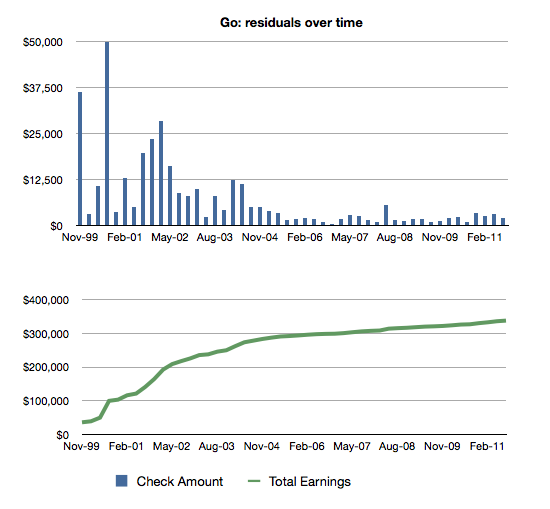
    I’m mostly a feature writer, so that’s been the bulk of my personal experience with residuals. For example, here’s a look at the residuals I’ve earned from Go from 1999 to 2011.

    bar and line chart of Go residuals

    For feature writers, residuals are an important way of keeping money coming in the door in the years between getting movies made. Without residuals, it would be difficult for many feature writers to stay full-time writers.

    As Craig and I often discuss on the podcast, most WGA members — including a lot of elected board members — don’t have firsthand experience with feature issues, including residuals. So I wanted to highlight some numbers about how feature residuals have changed over the years.

    I’m comparing two movies I wrote: 2005’s Charlie and the Chocolate Factory and 2019’s Aladdin. I picked them because they’re very similar movies — four-quadrant family films that made a lot at the box office. ((Inflation adjusting for 2019 dollars would put Charlie at $270M domestic and $621M worldwide.))

    Title Domestic Box Office Worldwide Box Office
    Aladdin $355,559,216 $1,050,693,953
    Charlie $206,459,076 $474,968,763

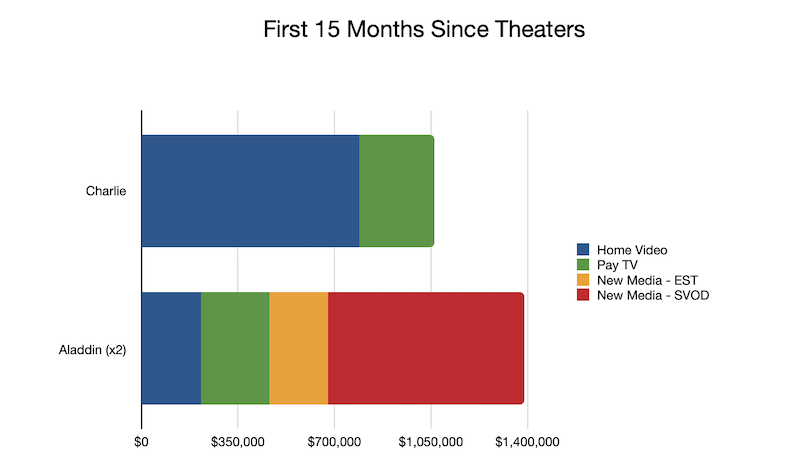
    As the writer, I know exactly how much these films paid out in WGA residuals. ((For Aladdin, the residuals are divided between me and the co-writer, so I’ve doubled them here.)) Here’s what each film generated in its first 15 months after concluding its theatrical release:

    Title Home Video Pay TV New Media – EST New Media – SVOD Total
    Charlie $789,439 $272,283 $0 $0 $837,146
    Aladdin $216,484 $247,324 $212,387 $712,104 $1,388,299

    Home video is what you think: DVDs, or VHS back in the day.
    Pay TV is cable, like HBO.
    New Media EST means “electronic sell-through,” like iTunes and such. There are rates for both purchase and rental.
    New Media SVOD stands for “subscription video on demand.” Think Netflix or Disney+.

    Here’s what this looks like in a bar chart:

    residuals bar chart

    A few takeaways:

    1. Residuals are still a thing. Aladdin has kicked off $1.3 million in WGA residuals so far.
    2. The home video market is much, much smaller than it used to be. My hunch is that Aladdin sold better on home video than many non-family movies, so for many titles, their home video percentage is probably even smaller.
    3. SVOD is huge, and largely makes up for the decline in home video.

    As consumers, it’s obvious that SVOD is the future. We’re not buying many DVDs. We’re cancelling our cable. And while we might still rent a movie, we’re more likely to see what’s on Netflix.

    As writers, we should be watching SVOD residuals very closely. They’re not built on the same foundations as our other sources, and could quickly collapse.

    Unlike home video or EST, SVOD residuals aren’t based on how many times someone watches our work. The streamers are loathe to share any information about viewership. So instead, SVOD residuals are treated more like pay TV and broadcast residuals in that writers are paid a percentage of the license fee. Basically, we get a cut of whatever the studio charges the streamer.

    That works great when Warners charges Neflix $100 million for Friends. But how do we make sure Disney isn’t selling Aladdin to Disney+ for less than it’s really worth?

    One way to look at self-dealing is to bring in comps. If you can show that a streamer paid $5M for a three-year license to a similar film, it’s hard to argue that it’s “really” worth only $1M. But that only works when there really is a market. Every studio basically has its own streaming service, so it’s increasingly difficult to show any comparative prices.

    An even bigger concern is what happens when these movies debut on the streamers. Remember: residuals are paid only on money earned outside of the initial venue. If Aladdin had debuted on Disney+ rather than in theaters, would it have generated residuals at all? I suspect that’s an open question, one that feels especially relevant as more movies are being pulled from theaters during the pandemic.

    Craig and I talk about these issues on episode 472 of Scriptnotes.

    Scriptnotes Writers Voting Live Event

    October 11, 2020 Citizenship

    Watch as John and Craig sit down with Ashley Nicole Black (A Black Lady Sketch Show) and Beth Schacter (Billions) to discuss democracy and work on our 2020 ballots.

    « Previous Page
    Next Page »

    Primary Sidebar

    Newsletter

    Inneresting Logo A Quote-Unquote Newsletter about Writing
    Read Now

    Explore

    Projects

    • Aladdin (1)
    • Arlo Finch (27)
    • Big Fish (88)
    • Birdigo (2)
    • Charlie (39)
    • Charlie's Angels (16)
    • Chosen (2)
    • Corpse Bride (9)
    • Dead Projects (18)
    • Frankenweenie (10)
    • Go (29)
    • Karateka (4)
    • Monsterpocalypse (3)
    • One Hit Kill (6)
    • Ops (6)
    • Preacher (2)
    • Prince of Persia (13)
    • Shazam (6)
    • Snake People (6)
    • Tarzan (5)
    • The Nines (118)
    • The Remnants (12)
    • The Variant (22)

    Apps

    • Bronson (14)
    • FDX Reader (11)
    • Fountain (32)
    • Highland (75)
    • Less IMDb (4)
    • Weekend Read (64)

    Recommended Reading

    • First Person (87)
    • Geek Alert (151)
    • WGA (162)
    • Workspace (19)

    Screenwriting Q&A

    • Adaptation (65)
    • Directors (90)
    • Education (49)
    • Film Industry (489)
    • Formatting (128)
    • Genres (89)
    • Glossary (6)
    • Pitches (29)
    • Producers (59)
    • Psych 101 (118)
    • Rights and Copyright (96)
    • So-Called Experts (47)
    • Story and Plot (170)
    • Television (165)
    • Treatments (21)
    • Words on the page (238)
    • Writing Process (177)

    More screenwriting Q&A at screenwriting.io

    © 2026 John August — All Rights Reserved.